Copied an object through JSON and lost the Date? Use structuredClone
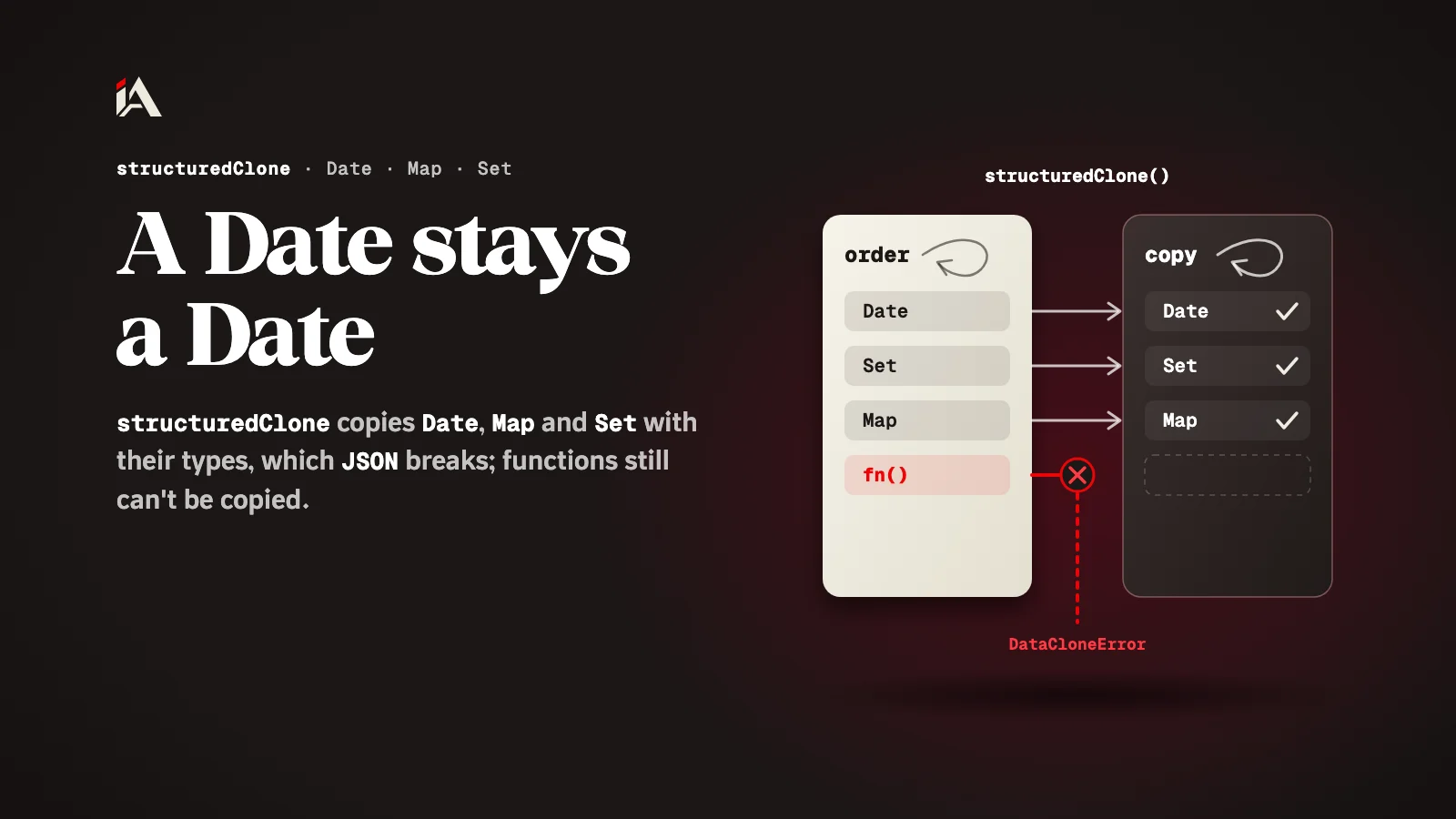
structuredClone makes a deep copy that keeps Date, Map, Set and circular references, which JSON.parse(JSON.stringify()) breaks. Functions and DOM nodes still can't be copied.
You want to edit a copy of an order in the cart without touching the original, so you write the familiar line JSON.parse(JSON.stringify(order)). The copy comes out, but the order date is now a string, and the Set of tags is now an empty object. By the end of this article you will know why that happens, how to copy with structuredClone, and which things you still have to copy by hand.
What is structuredClone?
structuredClone is a built-in JavaScript function that makes a deep copy of any value, which means it copies every level inside the object, not only the first one.
According to MDN's page on structuredClone, the function uses an algorithm called the structured clone algorithm, and its shape is structuredClone(value) or structuredClone(value, options). If any part of the value can't be copied, it throws a DataCloneError. The same page says it has been available across browsers since March 2022.
What breaks when you copy through JSON?
Copying with JSON.parse(JSON.stringify()) breaks every value that is not a JSON type: a date becomes a string, and a Map or a Set becomes an empty object.
MDN's page on JSON.stringify explains each case:
A Date has
toJSON(), which returns the same astoISOString(), that is, a string. AfterJSON.parseit stays a string, not a date.It visits only enumerable own properties, so a Map or a Set becomes
"{}".undefined, functions and Symbol values are dropped when they are inside an object, and becomenullwhen they are inside an array.A BigInt value or a circular reference (an object that points to itself) throws a TypeError.
const order = { createdAt: new Date(), tags: new Set(["paid"]) };
const viaJson = JSON.parse(JSON.stringify(order));

typeof viaJson.createdAt; // "string"
viaJson.tags;             // {}
In this example there is no error at copy time, so the mistake only shows up when the code treats createdAt as if it were still a date.
How do you copy an object with structuredClone?
You copy an object with structuredClone by passing it to the function, and you get back a new copy with the same values and the same types.
const order = { createdAt: new Date(), tags: new Set(["paid"]) };
order.self = order;

const copy = structuredClone(order);

copy !== order;        // true
copy.self === copy;    // true
The last two lines follow the idea of the MDN example: the copy is not the same object, and the circular reference is kept in the copy and points to the copy itself. Date, Map and Set are all types the algorithm copies, so they come out in the copy with their own types.
What can't structuredClone copy?
structuredClone can't copy functions or DOM nodes, and it does not carry over the prototype or getters and setters.
MDN's page on the algorithm lists them:
Thing | What happens |
|---|---|
Function | throws DataCloneError |
DOM node | throws DataCloneError |
Getters, setters and property descriptors | not copied: a readonly property becomes writable in the copy |
The prototype chain | not walked or copied |
Class private fields ( | not copied |
A RegExp's | not kept |
The same page says the objects it copies are plain objects only (like the ones you make with {}). So if you have objects from a class with methods or private fields, don't rely on structuredClone for them: write a copy method on the class itself, or copy only the plain data and build the object again.
When do you use the transfer option?
You use the transfer option when you have a large buffer and want to move it into the copy instead of copying it, and the original is emptied after that.
The MDN page says the objects you put in transfer are moved rather than cloned, and in its example the original's byteLength becomes 0 after the move:
const bytes = new Uint8Array([1, 2, 3, 4]);
const moved = structuredClone(bytes, { transfer: [bytes.buffer] });

bytes.byteLength; // 0
So after the move, don't use the original. This helps when a file or an image is large and you don't want to pay for two copies in memory.
Where do you start now?
Search your project for JSON.parse(JSON.stringify( and look at what goes through it: if there are dates, Maps or Sets, switch to structuredClone, and if there are functions or class objects, decide exactly what you want to copy.
If you work in TypeScript, see what changed in its latest beta. There are more articles like this one under the web development topic, and if you are just starting out, the developer roadmap is free.
Where is the last place in your code where you copied an object through JSON, and what was inside it?
FAQ
Does structuredClone copy an object made from a class?
Not the way you expect. The algorithm copies plain objects only, does not walk the prototype chain, and does not copy class private elements. Copy the plain data and build the object again.
Does structuredClone work in every browser?
Yes, in current browsers. MDN says it has been available across browsers since March 2022, and marks it as widely available.
What happens if the object holds a function?
structuredClone throws a DataCloneError and no copy is made. Remove the function before copying, or copy only the data.