How to store user passwords: Argon2id with the OWASP settings
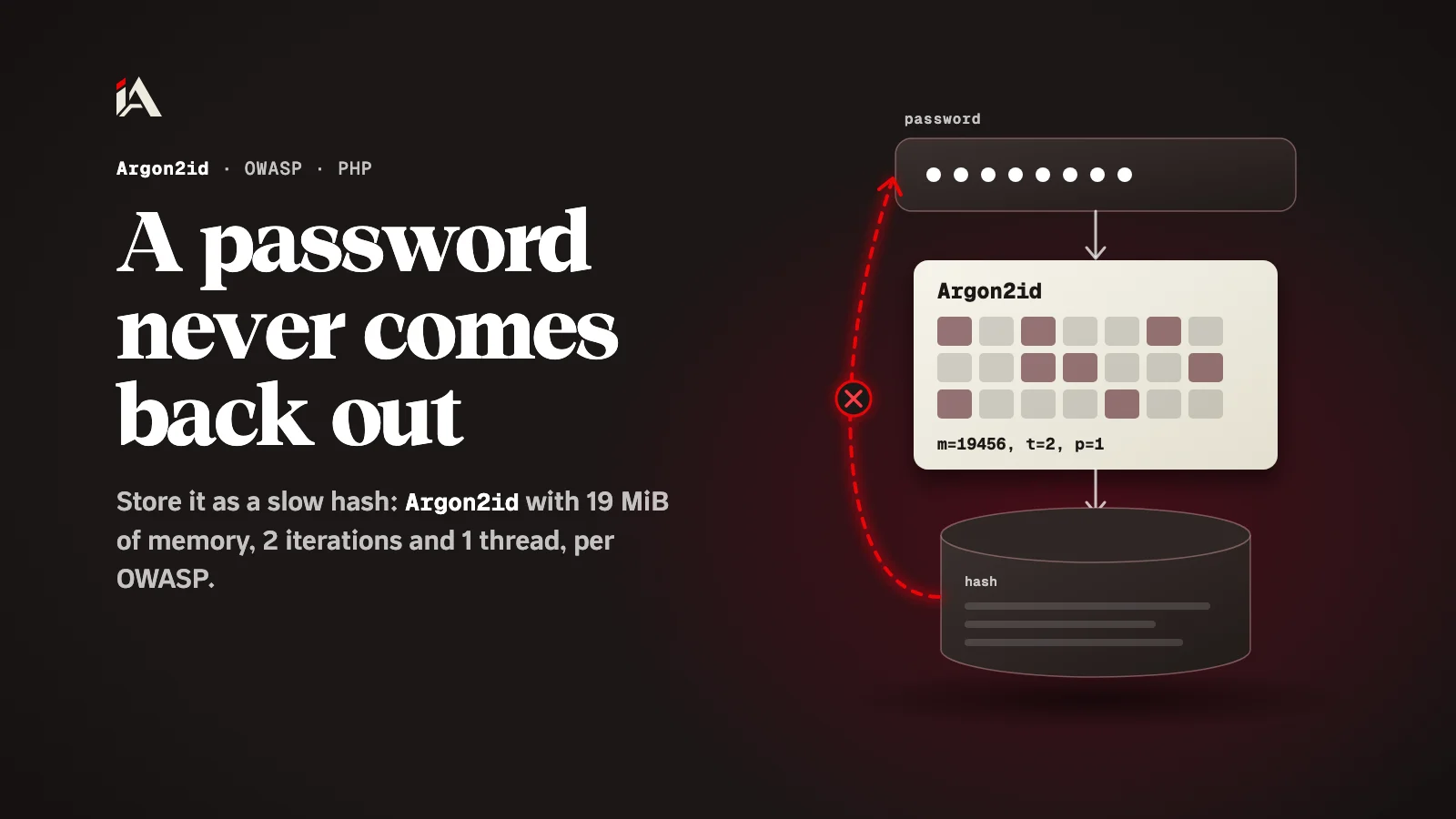
Store a password as a slow hash, not as encrypted text: Argon2id with 19 MiB of memory, 2 iterations and 1 thread per OWASP, and let the library make the salt.
The day your site's database leaks, the only thing standing between the attacker and your users' passwords is one line you wrote when you built the sign-up page: the function that turns a password into text in a table. If that line uses encryption with a key, or a fast hash, the leak becomes a password leak. Below you will see what to use instead, with which settings, and how to move old accounts over without locking anyone out.
Why is encryption the wrong way to store passwords?
Encryption works both ways: whoever holds the key gets the original password back, so if the key is stolen along with the database, every password is exposed.
A hash is a one-way function: it takes the password and produces a fingerprint, and there is no way back from the fingerprint to the password. When a user logs in, you hash what they typed and compare the two fingerprints. The OWASP Password Storage Cheat Sheet states this difference at the start: hashing is a one-way function, encryption is two-way, and attackers can retrieve the original plaintext from encrypted data.
The mistake many developers make is a logical one: they hear "protect the passwords", so they encrypt them. But your site never needs to know the password, it only needs to compare against it, so the safe column is one that even you cannot turn back into a password.
What is Argon2id, and with which settings?
Argon2id is a password hashing algorithm that is slow on purpose, and it is OWASP's first choice, with a minimum of 19 MiB of memory, 2 iterations and 1 degree of parallelism.
The slowness is the protection. Every guess costs the attacker memory and time, so running a long list of passwords against the stolen fingerprints becomes far more expensive. In the algorithm's own parameters these settings read m=19456, t=2, p=1: memory in KiB, the iteration count, and the number of threads.
OWASP also gives other combinations with the same level of defense, and the only difference between them is a trade-off between CPU and RAM usage. So if your server is short on memory, you can lower the memory and raise the iterations following the table in the cheat sheet.
What do you use if Argon2id is not available?
If Argon2id is not available, OWASP points to scrypt, and after it to bcrypt, only for legacy systems that have neither.
Algorithm | When | OWASP minimum settings |
|---|---|---|
Argon2id | First choice | 19 MiB of memory, 2 iterations, 1 thread |
scrypt | When Argon2id is not available | CPU/memory cost |
bcrypt | Legacy systems only | Work factor of at least 10, and as high as your server allows |
Watch one thing with bcrypt: most implementations read only the first 72 bytes of the password, so OWASP advises enforcing a maximum password length of 72 bytes when you use it.
Do you need to make the salt yourself?
No, the library makes the salt for you. A salt is a random value added to each password before hashing, so two users with the same password do not get the same fingerprint.
The OWASP cheat sheet says most widely used libraries generate and manage salts internally, so you do not write code for it. In PHP it is even clearer: according to the PHP manual page for password_hash, the salt option is deprecated, and as of PHP 8.0.0 an explicitly given salt is ignored.
A pepper is something else: an extra secret that is not stored with the hash, and it is added on top of the salt. If you decide to use one, store it like any secret key outside the database, and see how to rotate such secrets in our article on the Railway environment variable leak.
What does the code look like in PHP?
In PHP you use password_hash with PASSWORD_ARGON2ID to store the password, password_verify at login, and you pass the settings as options.
<?php
$options = ['memory_cost' => 19456, 'time_cost' => 2, 'threads' => 1];

$hash = password_hash($password, PASSWORD_ARGON2ID, $options);

if (password_verify($password, $hash)) {
    // log the user in
}
Three things from the same manual page to know before you copy the code:
PASSWORD_ARGON2IDwas added in PHP 7.3.0, and it only works if PHP was compiled with Argon2 support. Try it on your server before you rely on it.memory_costis in KiB, so19456is OWASP's 19 MiB. Thethreadsoption only works when PHP uses libargon2, not libsodium.PASSWORD_DEFAULTis bcrypt today, not Argon2id. If you want Argon2id, name it.
Keep the hash column in the database wide: the manual advises a column that can grow beyond 60 bytes, and 255 bytes is a good choice.
How do you move old passwords to Argon2id?
You move them at login: once the password matches the old fingerprint, you make a new Argon2id hash and save it in place of the old one.
PHP has a ready function for this. The password_needs_rehash manual page says it returns true when the stored hash does not use the algorithm and options you give it:
<?php
$options = ['memory_cost' => 19456, 'time_cost' => 2, 'threads' => 1];

if (password_verify($password, $storedHash)) {
    if (password_needs_rehash($storedHash, PASSWORD_ARGON2ID, $options)) {
        $newHash = password_hash($password, PASSWORD_ARGON2ID, $options);
        // save $newHash in the user record in place of the old one
    }
    // log the user in
}
This way the old and new hashes work side by side during the transition, and the OWASP cheat sheet says so directly: allow a mix of old and new hashing algorithms until the move is done. Accounts that never log in stay on the old fingerprint, so they need a different fix: expire the current password and ask the owner for a new one.
Where do you start today?
Open the code that saves the password on your sign-up page and see which function it uses. If it is encryption or a fast hash, replace it with Argon2id at the OWASP settings, and add the rehash step at login today.
The lesson for us as developers: a password is not stored so we can read it back, it is stored so we can compare against it. That is why you use a slow hash with a salt per user, so even if the fingerprints leak, every guess costs the attacker memory and time.
After passwords, the session is what protects the account: check the session cookie flags on your site. And if you want someone to test login and sessions on your platform along with every other weakness, Muhassan tests your platform and hands you a clear fix plan.
FAQ
What is the difference between a salt and a pepper?
A salt is a random value per password, stored with the hash, and the library makes it for you. A pepper is an extra secret that is not stored with the hash, and it is added on top of the salt, not instead of it.
What if my PHP has no Argon2 support?
PASSWORD_ARGON2ID only works if PHP was compiled with Argon2 support. Without it, OWASP points to scrypt, and to bcrypt only for legacy systems that have neither Argon2 nor scrypt.
How long should the hash column in the database be?
The PHP manual advises a column that can grow beyond 60 bytes, and 255 bytes is a good choice, because the length of the result can change when the algorithm changes.
Do I have to force every user to change their password when I change the algorithm?
Not always. You can rehash at login and let the old and new hashes work side by side during the transition. OWASP also suggests expiring the current password and asking the user for a new one.