aBlocks plugin: an 8.8 flaw lets a Contributor become Editor
aBlocks versions up to 2.17.0 have an 8.8 flaw that gives a Contributor a full Editor session. Update to 2.18.0, the latest version, and review your Editor accounts.
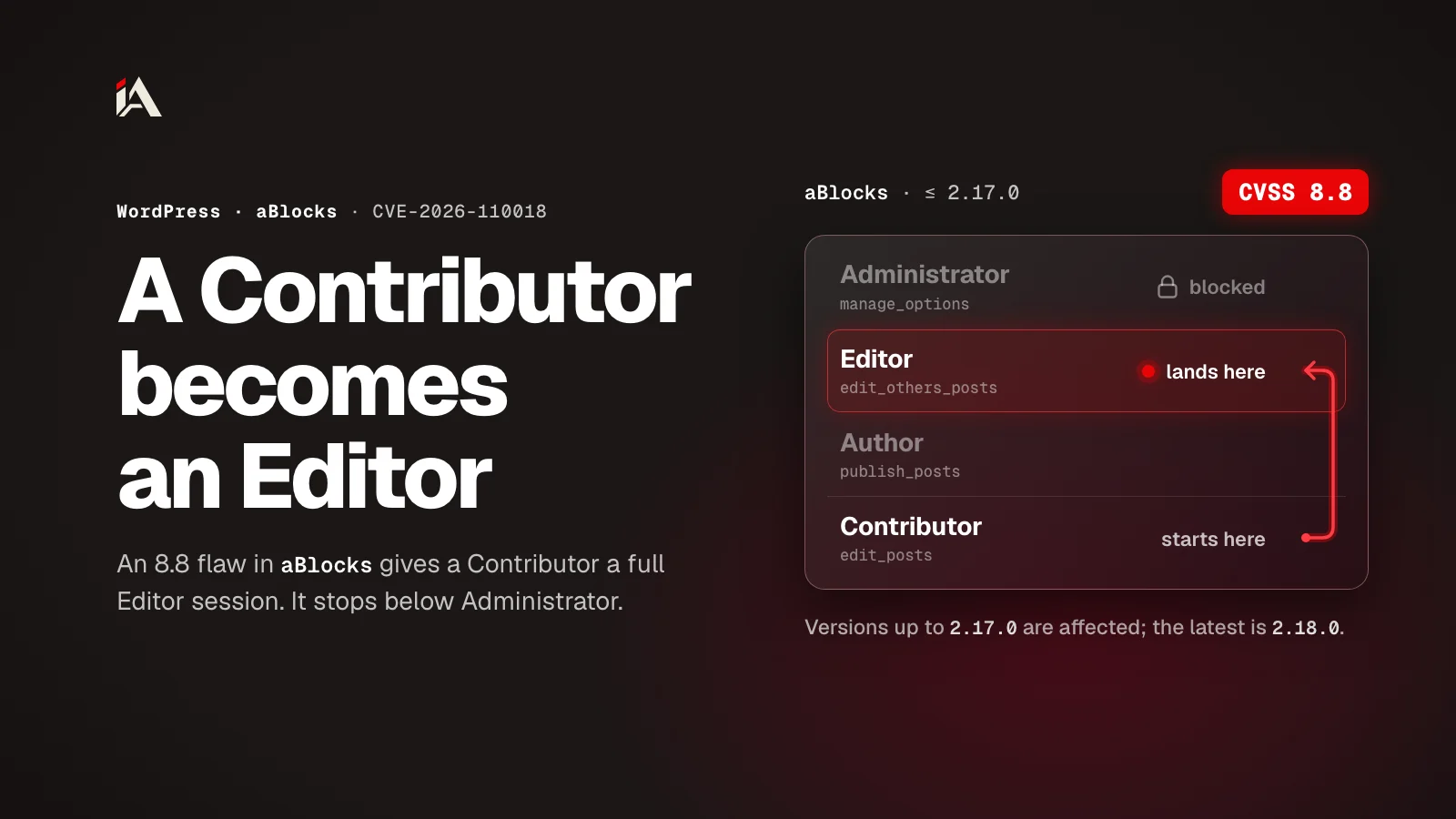
If your WordPress site runs the aBlocks plugin and you have Contributors writing drafts, there is a new flaw to watch. A CVE record dated October 24, 2026 documents a privilege-escalation flaw in the plugin, scored 8.8 out of 10 on CVSS: a Contributor can become Editor with a fully authenticated session, without stealing anyone's password and without being an admin. Every version up to 2.17.0 is affected.
What is the flaw?
CVE-2026-110018 is a privilege-escalation flaw in the aBlocks plugin: a Contributor account gets a higher role through the user registration endpoint of the plugin's forms.
aBlocks is a Gutenberg blocks plugin with a user dashboard builder, a popup builder and a form builder. The weak point is the form builder's registration REST endpoint: /ablocks/v1/form-builder/registration.
The endpoint is registered with no permission check: its permission_callback always returns true. And the register handler reads the roleSlug field straight from block attributes the attacker controls in the post content, and never checks that the form type is "registration". That type check exists, but it runs at save time and is not repeated at execution time.
How does a Contributor become Editor?
The Contributor hides a role of their choice inside a saved form, then gets the registration endpoint to apply it. The steps, as the record describes them:
The Contributor saves a form block with the type "login" instead of "registration", so the
roleSlugfield keeps the value they chose, because the save-time check does not apply to the login type.Then they call the registration endpoint with a valid
wp_restnonce and pass the post-ownership check because the draft is theirs, so the register handler reads the savedroleSlug.The handler creates a new account from the form data, gives it the saved role with
WP_User::set_role(), and logs it in withwp_set_auth_cookie(). The attacker ends up with a fully authenticated session at the new role.
According to the plugin's own code, the register handler rejects the request before creating any account when registration is closed in WordPress settings (the "Anyone can register" option), so the risk is on sites with open registration.
Escalation stops below the admin role: the internal is_safe_registration_role() check rejects any role with powers such as manage_options, edit_users, delete_users, create_users, promote_users or edit_theme_options. So on a standard WordPress install, the highest role the attacker reaches is Editor.
A WordPress Editor publishes and edits other people's posts and the site's pages, and uploads files. An attacker who could only save drafts can now publish under your site's name and change other people's work.
What is the fix status?
The record lists versions up to 2.17.0 as affected, and the latest aBlocks version is 2.18.0, so the right move is to update to 2.18.0.
The plugin's page on WordPress.org shows 2.18.0 released on October 20, 2026, and its changelog has one line: a fix for "Dynamic Content Security issues."
The changelog does not name this flaw or mention the registration endpoint, so you cannot treat it as proof that 2.18.0 is the version that closed it. Update anyway, and watch the plugin page for a clearer statement from its developer.
We saw the same story with the stolen UpdraftCentral keys: one plugin with wide powers is enough to open a whole site. Here, a blocks plugin with more than 2,000 active installs became a door to role upgrades because one check sat in the wrong place.
What should you do now?
Update aBlocks to 2.18.0, then review your Editor accounts, your request logs and your registration policy.
Open the Plugins screen in your dashboard and check your aBlocks version. If it is 2.17.0 or older, update now to the latest version, 2.18.0.
Review your user list: any Editor account you do not recognize, or any Contributor who became Editor without your say, goes down to Subscriber while you look into it, before you give back any privilege.
Review request logs for the
/ablocks/v1/form-builder/registrationendpoint, especially requests from Contributor accounts.If your site has open registration or accepts outside contributors, review that policy: every new Contributor can use this flaw until you confirm your version is updated.
WordPress itself is tidying up how it stores secrets: WordPress 7.2 beta brought an official place for API keys. That does not close a hole in an old plugin, so keeping plugins updated is still your job.
When did you last review user roles on your site?
If you cannot remember, now is the time, especially if you run aBlocks with Contributors. All this flaw needed was an ordinary Contributor account on a site with open registration, and a registration endpoint that trusts saved content as it is.
If you write plugins: any field that affects permissions must be checked when it is used, even if it was checked when it was saved, because the attacker controls the stored content. In aBlocks, the form was saved as "login" and passed the check, then the registration endpoint used the role inside it.
After you update, ask yourself: how many of your plugins accept input from low roles and trust it at execution time?
If you want someone to find the holes in your site before anyone else does, Muhassan tests your platform and hands you a clear fix plan.
FAQ
Can the attacker become site administrator?
No, on a standard WordPress install. The internal check rejects roles with admin powers such as manage_options and edit_users, so the highest role the attacker reaches is Editor.
I run 2.18.0, am I safe from this flaw?
According to the CVE record, yes: affected versions run up to 2.17.0. The 2.18.0 changelog does not name this flaw, so stay on the latest version and watch the plugin page for a clearer statement from the developer.
Does the flaw need a registered account?
Yes. The attack needs an account at Contributor level or above, someone who can save drafts. And according to the plugin's code, the registration endpoint rejects the request when registration is closed in WordPress settings, so sites with open registration that accept outside contributors are the most exposed.
How do I know if someone exploited it on my site?
Review your user list for any Editor account you do not recognize, because the registration endpoint creates a new account with the saved role. And check request logs for ablocks/v1/form-builder/registration, especially from Contributor accounts.