Same instructions in every Claude request? Cache them
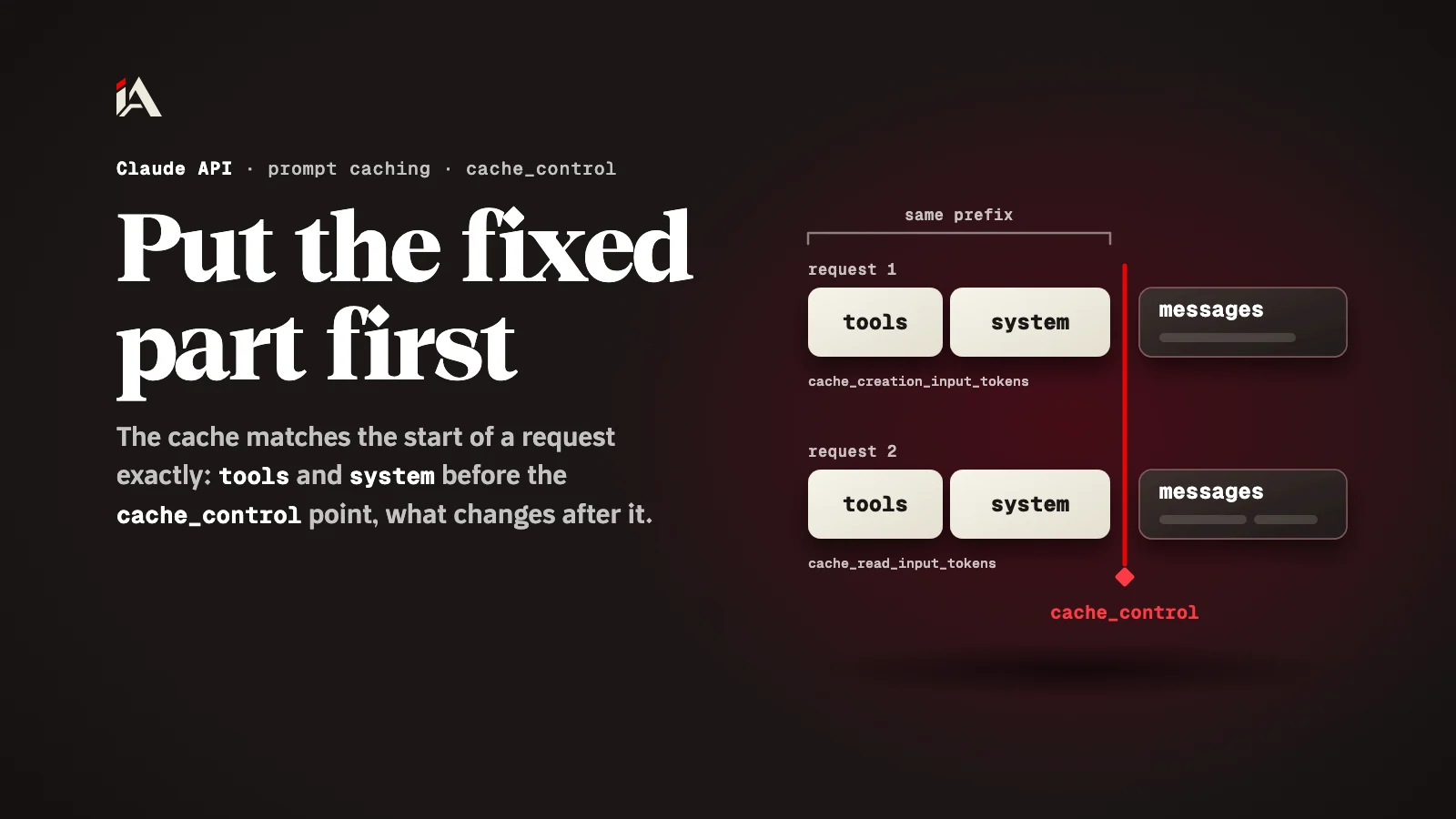
Prompt caching in the Claude API stores the part of your request that repeats, and reading it back costs a small fraction of the input price. The cache matches the prefix exactly, so put the fixed part first.
Your app on the Claude API sends the same long instructions with every message: the assistant's role, examples, and the tool descriptions. Those same instructions are charged as full input on every request, as if it were the first time. By the end of this article you will know how to have them charged once, and confirm with numbers that they are being read from the cache.
What is prompt caching?
Prompt caching is a Claude API feature that stores the start of a request that repeats, so when you send it again it is read from the cache at a lower price and in less time.
According to Anthropic's prompt caching docs, the system checks whether the prompt prefix, up to the cache breakpoint you set, is already cached from a recent query; if it finds it, it uses it, and if not, it processes the full prompt and caches the prefix. Writing to the cache for five minutes costs 1.25 times the base input price, and reading costs 0.1 of it, except on Claude Opus 5.5 and Claude Sonnet 5.5, where reads cost 0.05. The cache lives five minutes by default, and is refreshed at no extra cost every time it is read.
Why does the cache miss even though you turned it on?
The cache misses because it matches the start of the request exactly, and any small change at the start makes the request new as far as the cache is concerned.
The docs say it plainly: cache hits require 100 percent identical prompt segments, all text and images up to and including the block marked with cache_control. This is where the most common mistake happens: we put a line like "the current date and time" or the user's name at the top of the system prompt, so the model knows them. One line that changes with every request, and the cache behind it never matches, so you pay the higher write price on every request instead of saving.
How does Claude order the cache?
The Claude API builds the cache in a fixed order: tools (tools) first, then the system prompt (system), then the messages (messages).
So what comes earlier affects what comes after it: per the docs' table, modifying tool definitions invalidates the entire cache. That is why the docs advise placing static content at the beginning of the request: tool definitions, system instructions, context and examples, and marking its end with cache_control. What changes, like the time, the user's name and their question, goes after that point, inside the messages.
This is how you mark the end of the fixed part in the system prompt:
"system": [
  {
    "type": "text",
    "text": "Your fixed instructions, tool guide and examples go here.",
    "cache_control": {"type": "ephemeral"}
  }
]
If you don't want to set the point yourself, you can put cache_control at the top level of the request, and the system places the breakpoint on the last cacheable block by itself and moves it forward as the conversation grows:
"cache_control": {"type": "ephemeral"}How do you confirm the cache is working?
You confirm it with two fields in usage in the response: cache_creation_input_tokens tells you how much was written to the cache, and cache_read_input_tokens how much was read from it.
In order:
Send the same request twice in a row, within five minutes.
In the first response you should see a number in
cache_creation_input_tokens, and in the second a number incache_read_input_tokens.If both fields are zero in both responses, the docs say the prompt is likely shorter than the minimum: 512 tokens for models like Claude Opus 5.5 and Claude Sonnet 5.5. A shorter prompt is not cached, and no error is returned.
If the first one wrote and the second one wrote again instead of reading, look for something that changes at the start of the request, like the time.
And if your conversation has more than one fixed part, the docs allow up to 4 cache breakpoints in one request.
Where should you start now?
Open your app's system prompt and look for anything that changes from one request to the next: the date, the name, or a session number. Move it to the first user message, put cache_control after the fixed part, and try the two requests.
If your agent reads emails or pages from outside, also read how to limit an AI agent's tools, and for an earlier change in the API itself see the article on temperature being removed in the Claude API. And if you want ready-made skills for coding agents, there is the AI skills section.
What is the first line of your system prompt right now?
FAQ
How long does the cache last?
Five minutes by default, refreshed at no extra cost every time it is read. There is also a one-hour option with a higher write cost, using ttl set to 1h.
Why are the cache fields zero even though I set cache_control?
Usually because the prompt is shorter than the model's minimum. The docs say shorter prompts are not cached and no error is returned, so both fields show zero.
Can someone else hit my cache if they send the same instructions?
No. The docs say caches are isolated between organizations even with identical prompts, and also by workspace within an organization on the Claude API.