Turn on CSP without breaking your site: start with Report-Only
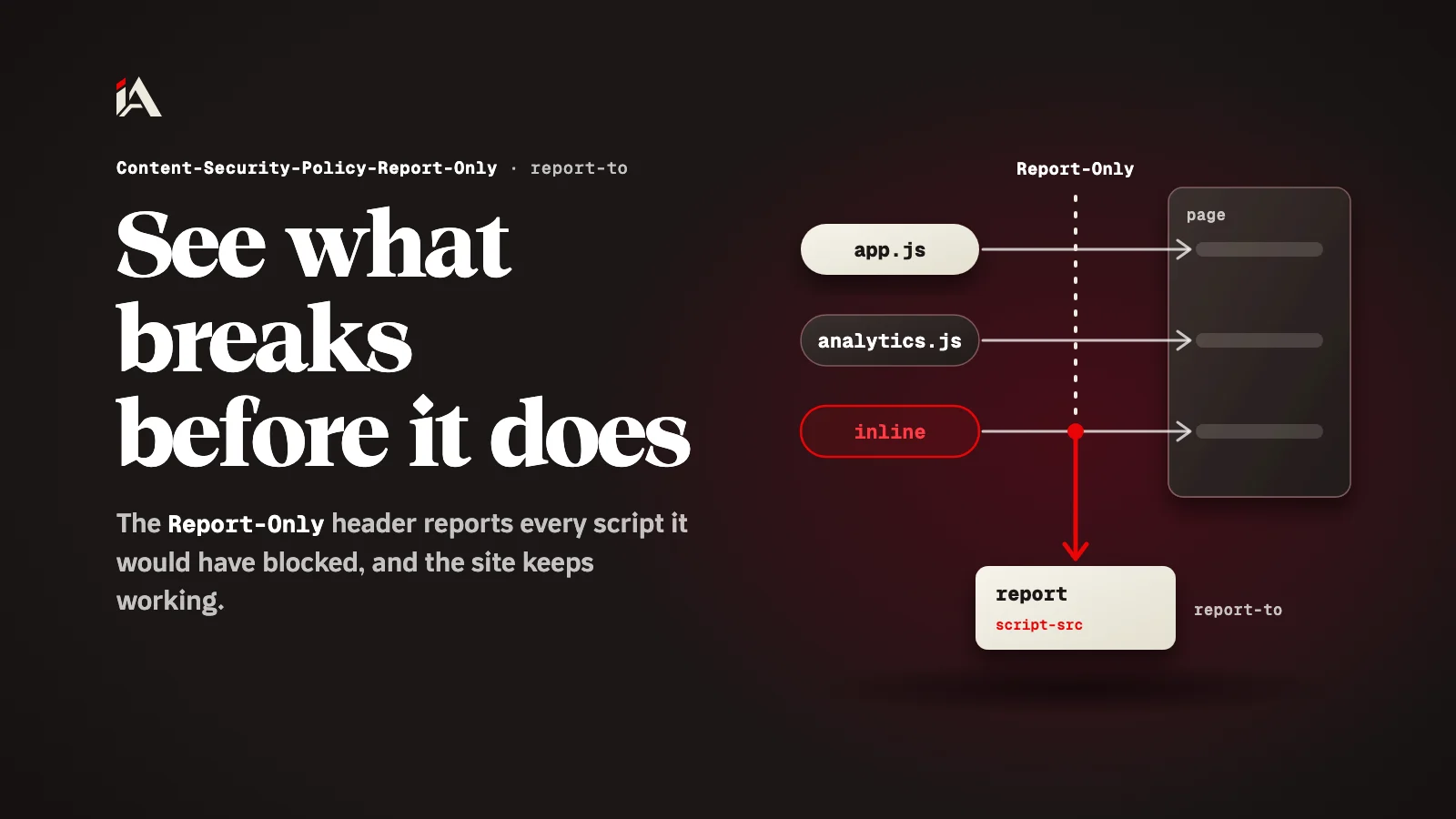
Ship your CSP first in the Content-Security-Policy-Report-Only header: the browser reports every script it would have blocked and the site keeps working. Fix the violations, then enforce it.
One comment on your site that was never escaped is enough to run code in the browser of everyone who opens the page. The protection that closes that door is one header, but many developers try it once, half the site breaks, and they take it off. In this article you will add it in a way that breaks nothing, and find out exactly what to fix before you enforce it.
What is a Content Security Policy?
A Content Security Policy is a list of instructions your site sends to the browser, telling it what the page's code is allowed to load and run.
According to MDN's CSP guide, its main use is defense against XSS, where an attacker injects code into your site. The first thing that changes: if the policy has default-src or script-src, JavaScript written inside the page will not run unless you allow it in a clear way.
Why does turning CSP on straight away break sites?
Turning CSP on straight away breaks sites because the browser stops every script the policy doesn't allow, and developers rarely know every script their pages load.
The analytics script, the chat button, an onclick in an old template, code a teammate added a year ago: they all stop at the same moment. This is where the mistake that undoes all the work happens: the developer adds 'unsafe-inline' to get the site working again. The same MDN guide warns against it by name, because it defeats much of the purpose of having a CSP: inline JavaScript is one of the most common XSS vectors, and it is exactly what the policy is there to stop.
So the mistake was the order: we turned on blocking before knowing what would be blocked.
How does Content-Security-Policy-Report-Only solve this?
The Content-Security-Policy-Report-Only header reads the same policy but blocks nothing: the browser records every violation and sends it to an address you choose, and the site keeps working as it is.
Instead of learning what broke from your customers, you learn what would have broken from the reports. According to MDN's page for the header, the report-to directive must be there for reports to be sent, and without it the header does nothing. The header has been available across browsers since August 2016. This is how it looks with a reporting endpoint:
Reporting-Endpoints: csp-endpoint="https://example.com/csp-reports"
Content-Security-Policy-Report-Only: script-src 'nonce-{RANDOM}'; object-src 'none'; base-uri 'none'; report-to csp-endpoint
The policy in this example is the strict policy MDN's guide recommends: a script runs only if it carries the right nonce. A nonce is a random value the server generates fresh for every response, and puts in the header and in the nonce attribute of every <script> tag it wants to run. A script injected by an attacker doesn't know the value, so the browser refuses it.
How do you move your site to CSP, in order?
You move your site to CSP in four steps, and you only turn on blocking in the last one:
Add the two headers above from your server or hosting settings, not in a
<meta>tag: a Report-Only policy is not accepted there. The site keeps working normally, and reports start to arrive.Open the important pages yourself, login, checkout and the dashboard, and look at the browser Console and at the reports that came in. Each line names the script that would have been blocked.
Fix each violation: move inline code into a file, or give it the nonce from the server, and use
addEventListenerinstead ofonclickand its siblings. Go back to step 2 until only reports from browser extensions are left.Rename the header to
Content-Security-Policy. Blocking is now on, and any future change to the policy you test first in a second Report-Only header next to it.
Where should you start now?
Start with one page that matters, like the login page, and put Report-Only on it today. After a day you will know how many scripts need work.
If your site loads scripts from a CDN, continue with locking CDN scripts with Subresource Integrity, and for another header that protects the first request, see turning on HSTS the right way. And if you want someone to try injecting code into your site before someone else does, that is the work of Muhassan.
How many inline scripts do you think your pages have right now?
FAQ
Can I put the Report-Only policy in a meta tag?
No. MDN says a report-only policy cannot be delivered in a meta element, so it has to come as a header from your server or hosting settings.
Why not just add unsafe-inline and be done?
Because MDN says unsafe-inline defeats much of the purpose of having a CSP. Inline JavaScript is one of the most common XSS vectors, which is exactly what you want to stop.
How long should the site stay on Report-Only before I enforce?
There is no fixed number. Keep it until you have gone through every important page, login, checkout and the dashboard, and new reports come from browser extensions, not your own scripts.