NGINX flaws, October 2026: does your nginx.conf leave you exposed?
NGINX 1.30.6 and 1.31.7 fixed five vulnerabilities on October 14, 2026, and each one has a config that opens it up. nginx -T with grep catches most of their patterns, and upgrading fixes all five.
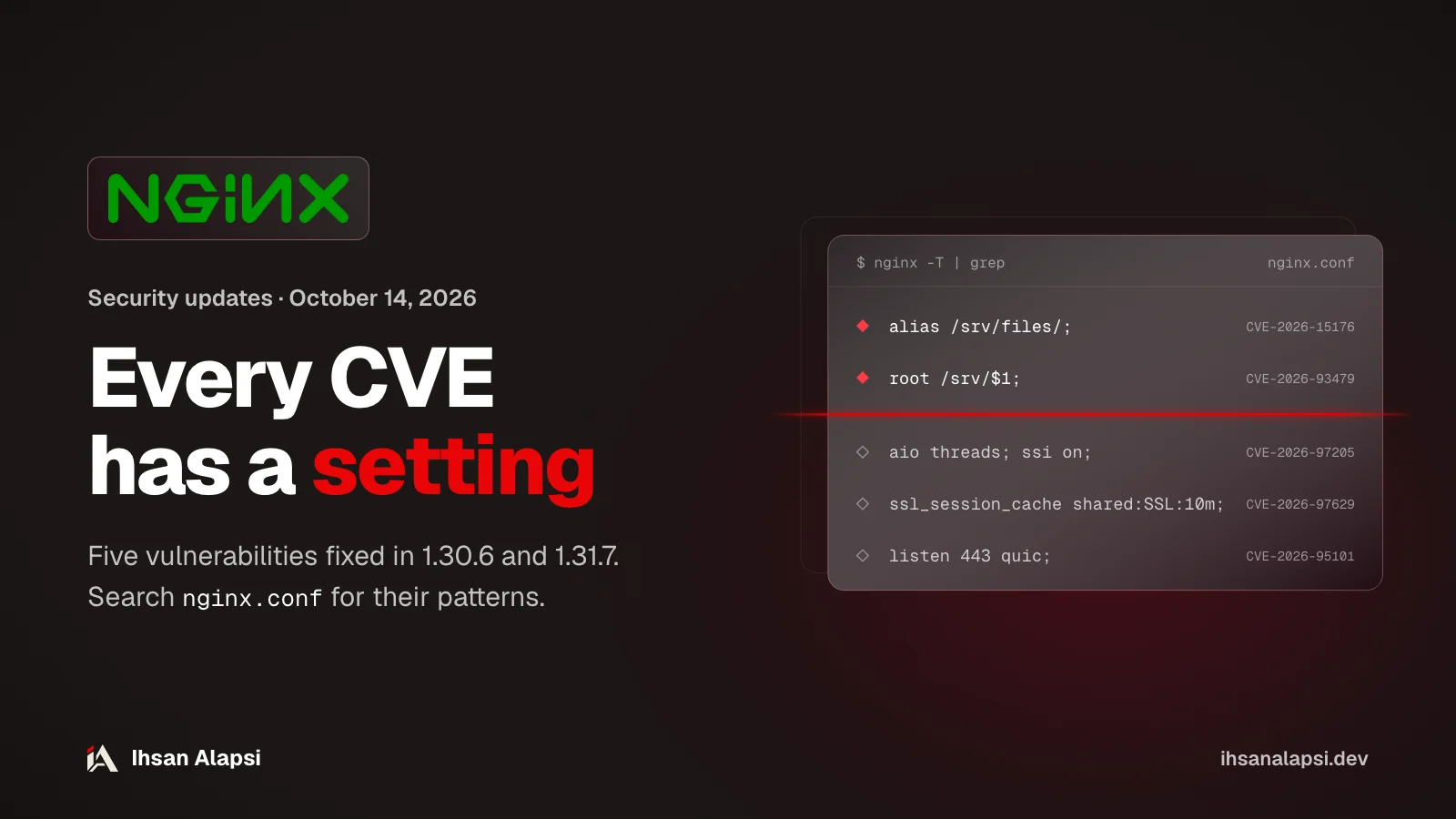
If you have NGINX in front of your site on a VPS or inside a Docker container, the news probably reached you like this: five vulnerabilities, and three of them scored 9.2. Most of these vulnerabilities only open up with a specific config, so before you decide whether this concerns you, run nginx -v and nginx -T and compare the output with the table below.
What did NGINX 1.30.6 and 1.31.7 fix?
NGINX 1.30.6 on the stable line and 1.31.7 on the mainline came out on October 14, 2026, and fixed five vulnerabilities: three in memory handling, one in TLS, and one in HTTP/3. Any version from 0.1.29 to 1.30.5 on stable, or up to 1.31.6 on mainline, falls in the range of at least one of them.
The release is listed in the nginx.org news on the same day, along with njs 1.0.2, which has two fixes for XML parsing. Today, October 21, 1.31.8 came out on mainline, and its changelog has no new security fixes. The security advisories page lists "1.31.7+" under "Not vulnerable", so 1.31.8 isn't affected either.
If you've been putting off the upgrade since the summer, 1.30.6 also fixes older vulnerabilities. One of them is CVE-2026-42533, which NGINX rated "major" and which was fixed in 1.30.4 and 1.31.3 on July 15, 2026.
Which config triggers each vulnerability?
Each of the five vulnerabilities opens up with a specific combination of settings. But CVE-2026-93479 also has a second path whose conditions F5 hasn't explained, so it's the only one your config alone can't rule out.
F5 is the organization that issues the CVE IDs for NGINX, and it published the conditions and workarounds on October 14. The version ranges come from the nginx.org security advisories:
Vulnerability | Config that triggers it | Affected versions | Workaround until you upgrade |
|---|---|---|---|
CVE-2026-15176: heap overflow | A | 0.1.29 to 1.31.6 | Remove |
CVE-2026-93479: heap overflow | A | 1.30.0 to 1.30.5, and 1.31.2 to 1.31.6 | Named captures instead of numbered ones, and only inside the block that holds the regex |
CVE-2026-97205: use-after-free |
| 0.8.11 to 1.31.6 | Turn off |
CVE-2026-97629: TLS session forgery |
| 1.23.2 to 1.31.6 | Remove the whole |
CVE-2026-95101: extra bytes in the request to the backend, and bypassing | HTTP/3 with a proxy and | 1.25.0 to 1.31.6 |
|
The commit that fixed the alias vulnerability includes this example, where the request /foo/1 caused a buffer overflow:
location /foo/ {
    alias /bar/;
    rewrite ^/foo/.*$ /x;
    return 200 $request_filename;
}
The rewrite changed the URI to /x, and NGINX hadn't picked a new location yet. In that window, mapping the URI to a file path can write outside the allocated memory if the location prefix (here /foo/) is longer than the new URI.
In the TLS vulnerability, each worker has three slots for session ticket keys, but key rotation copied only two of them, so the third stayed uninitialized memory (the fix commit). F5 says an attacker could use it to bypass client certificate verification, and that the forgery happens in a random way the attacker doesn't control. So if your server requires a client certificate with ssl_verify_client, upgrade that server first.
Why does NGINX say "medium" while F5 gives 9.2?
The two ratings come from two different systems. The nginx.org advisories page gives each vulnerability a word, and all five are "medium". F5 calculates a CVSS score: the three memory vulnerabilities got 9.2 on CVSS v4.0 and 8.1 on v3.1.
CVSS is a scale from 0 to 10 that describes a vulnerability by how the attack works and what it does, and 9.0 and above is called Critical. The CVSS v4.0 specification says the base score assumes the worst reasonable impact across different environments, not your environment, and it includes Environmental metrics so everyone can adjust the score to their own setup.
According to F5's vector for the three, the attack comes over the network, with no sign-in and no interaction from anyone, but its complexity is high (AC:H). In the specification, that value means the attack needs to get past a protection like ASLR. F5's description of them says the worker may crash or restart, and code execution is possible if ASLR is off or the attacker manages to bypass it. The TLS vulnerability got 8.3 and the HTTP/3 one got 6.9, both on v4.0.
The nginx.org page doesn't explain how it picks the word, but the same page gives "major" to other vulnerabilities, like CVE-2026-42533.
In practice, your version and the pattern in your config decide where you stand. If the pattern is there and the version is in range, upgrade today or apply the workaround now. If the pattern isn't there, upgrade at your next maintenance window, because configs change and grep doesn't catch everything.
How do you check your server with nginx -v and nginx -T?
nginx -v prints the version, and nginx -T tests the config and prints all of it, including every file pulled in with include, so you search for the five patterns in one file.
Run
nginx -v. If you get 1.30.6 or later on stable, or 1.31.7 or later on mainline, all five are fixed for you. If the version comes from your distribution's package, the number alone isn't enough, and the reason is in the upgrade section below.Dump the whole config to a file with
sudo nginx -T > ~/nginx-full.conf. In Docker:docker exec <container> nginx -T > ~/nginx-full.conf, ordocker compose exec <service> nginx -T > ~/nginx-full.conf. According to the NGINX command-line docs,-Tworks like-tand also prints the config files.Run the commands below on the file, and read every line that comes up within the
serverorlocationit belongs to.
# CVE-2026-15176
grep -nwE 'alias|rewrite' ~/nginx-full.conf
grep -n 'request_filename' ~/nginx-full.conf

# CVE-2026-93479
grep -nw 'map' ~/nginx-full.conf
grep -nE '\$[1-9]' ~/nginx-full.conf

# CVE-2026-97205
grep -nwE 'aio|ssi' ~/nginx-full.conf

# CVE-2026-97629
grep -nE 'ssl_session_(cache|ticket_key|tickets)' ~/nginx-full.conf

# CVE-2026-95101
grep -nE 'quic|proxy_pass|proxy_request_buffering' ~/nginx-full.conf

# njs
grep -nE 'js_(import|content|set)' ~/nginx-full.conf
How to read the output
If
aliasandrewriteare in the samelocation, along with$request_filenamein that samelocationor inlog_format, that's the CVE-2026-15176 pattern.$1on its own is normal, because it shows up in lots ofrewritelines. What matters is$1insiderootorlog_formatin a config that has amapwith~. According to the commit that fixed it, the impact of the log path is limited to a single null byte written past the boundary, and the more dangerous path is computingrootfrom variables. And if you found nothing, the second path that hasn't been explained is still there, so grep here doesn't rule it out.aio onoraio threadswithssi onactive in the samelocation, even if one of them is written inhttporserverand thelocationinherited it: look in the pages served through it forinclude virtual.ssl_session_cache shared:withoutssl_session_ticket_keyand withoutssl_session_tickets offis the CVE-2026-97629 pattern. If your certificate comes from Let's Encrypt through certbot, the current version ofoptions-ssl-nginx.confin the certbot repo hasssl_session_cache shared:le_nginx_SSL:10malong withssl_session_tickets off. Make sure the second line shows up in yours.quicin alistenline, withproxy_passin the sameserver, and noproxy_request_buffering off: that's the CVE-2026-95101 pattern. The HTTP/3 module isn't built by default when you build from source, andnginx -Vtells you whether your build has--with-http_v3_module.If
js_import,js_contentorjs_setshows up, you're using njs, and it has its own update, njs 1.0.2.
If you have several servers and their configs live in a git repo, you can give the same commands to a coding agent like Claude Code to go through them and collect the results in a table for you. The AI skills section of the store has skills for Claude Code and other coding agents.
How do you upgrade, depending on how you installed it?
Upgrading to 1.30.6, 1.31.7 or later fixes all five, and the path depends on where your NGINX comes from: the nginx.org repo, the distribution package, or a Docker image.
From the nginx.org repo
If you installed from the nginx.org repositories, the upgrade is a normal package update. The repo has packages for Debian 12 and 13, Ubuntu 22.04, 24.04 and 26.04, RHEL 8 to 10 and others, and mainline has its own mainline/ path in the URL. On Debian and Ubuntu:
sudo apt update && sudo apt install --only-upgrade nginx
nginx -v
sudo systemctl restart nginx
After the upgrade, restart, don't reload. According to the docs on controlling NGINX, a reload reads the config again and starts new workers with the same binary, and the new binary needs a USR2 signal or a fresh start.
From the distribution package
Debian backports the fix to the version it ships instead of bumping the number, and its tracker marks all five "fixed" in forky at version 1.30.4-8, which is lower than 1.30.6. That's why the nginx -v number from a distribution package can't be compared with the nginx.org table, and the reference is your distribution's security tracker.
It works the other way too: a package whose number is outside the range can be affected. According to the security update DSA-6575-1 that Debian published on October 21, 2026, the code affected by CVE-2026-93479 entered the trixie (Debian 13) package when they backported an older security fix, even though its range in the nginx.org advisories starts at 1.30.0. The same update fixes all five in trixie at version 1.26.3-3+deb13u10, so on Debian 13, apt upgrade from the security repo brings you the fix.
On bookworm (Debian 12, version 1.22.1), the Debian tracker still lists all five as "vulnerable" as of October 21. According to the nginx.org advisories, 1.22.1 is outside the range of three of them (CVE-2026-93479, CVE-2026-95101 and CVE-2026-97629), but after what happened in trixie, rely on the tracker. And the Ubuntu tracker lists "Needs evaluation" for all five on every release. On these releases, apt upgrade alone won't bring you the fix right now, and you have two options: move to the nginx.org repo, or apply the workaround from the table for each pattern you found and keep watching the tracker.
In Docker
The official images on Docker Hub now have the fix. As of October 21, 2026, the nginx:stable and nginx:1.30 tags have the same digest as nginx:1.30.6, the nginx:mainline, nginx:latest and nginx:1.31 tags match nginx:1.31.7, and the alpine variants do too. But an image you built before this stays on the old version until you rebuild it:
# image: nginx:... used directly
docker compose pull
docker compose up -d

# Dockerfile with FROM nginx:...
docker compose build --pull
docker compose up -d

docker compose exec <service> nginx -v
Watch out for tags pinned to an old line. The nginx:1.28 tag was last pushed on April 7, 2026, a week before 1.30.0 (April 14), and version 1.28 falls in the range of four of the five. Here a rebuild brings nothing new: change the tag to nginx:1.30 or later.
If you use njs
njs is the JavaScript module for NGINX, and it runs with js_import and js_content. njs 1.0.2 came out on October 14 and fixed two vulnerabilities in XML parsing, and the affected versions are 0.7.10 to 1.0.1 according to the njs security advisories:
CVE-2026-101025: every time
xml.parse()fails on broken XML, some allocated memory stays in the worker, so memory grows without limit. It affects the built-in engine only, and the workaround according to F5 isjs_engine qjs.CVE-2026-101019: in signed XML, an attribute value can come out missing or truncated while the signature stays valid. It affects both engines, njs and QuickJS, so
js_engine qjsdoesn't fix it, and the fix is njs 1.0.2. F5 says nginx-saml with the built-in engine is confirmed affected.
What is still unknown about these NGINX vulnerabilities?
As of October 21, 2026 there's no published exploit for any of the five NGINX vulnerabilities. What's still missing today is the full conditions for two of them, the range of old versions in F5's records, and when the fix will reach Ubuntu and Debian 12.
The CVE-2026-93479 record says the same overflow can also happen from a variable whose value isn't stored (in NGINX terms: non-cacheable) inside a string expression, "under certain conditions", and the record doesn't name those conditions. According to the NGINX development guide, a variable like that has its value computed again every time it's read, like $time_local. And the CVE-2026-97205 record says aio opens it up only "in certain configurations", without listing those configs. So if grep found aio and ssi together, your server may be affected and the record doesn't settle it; and if it didn't find the CVE-2026-93479 pattern, that doesn't rule it out. Either way, the upgrade fixes the vulnerability.
F5's records for all five include a note that they don't evaluate versions that have reached End of Technical Support. And some of their ranges are narrower than the nginx.org advisories: the CVE-2026-97205 record starts at 1.30.0 while the advisories page starts at 0.8.11, and the CVE-2026-97629 record starts at 1.23.3 while the advisories page starts at 1.23.2. If a scanner or a vulnerability site tells you an old version is out of range, compare it with the nginx.org advisories, because that's the project's own page for the open source version.
On Ubuntu, the page for each of the five says "Needs evaluation" on every release, and its last update in the tracker was on October 15. According to Ubuntu's page explaining the statuses, this status means it isn't known yet whether the package is affected on that release.
Where do you start now?
Start with nginx -v on every server and every container you have, because the version, if it comes from nginx.org or Docker, settles whether all five are fixed before any grep; for a distribution package, the reference is your distribution's tracker.
Write down the version for each server and container, and where it comes from: nginx.org, the distribution, or Docker.
Run
nginx -Tand the commands above, and mark every pattern from the table that you found.Upgrade to 1.30.6, 1.31.7 or later, or to the distribution package that its tracker lists as "fixed". If you can't upgrade today, apply the workaround for the pattern you found, then run
sudo nginx -t && sudo systemctl reload nginx.Rebuild your images with
--pull, and confirm withnginx -vinside the running container.
The config is one layer of the server. The application code behind NGINX has its own vulnerabilities in permissions and IDOR, and the Security Skill Pack reviews that code before you deploy; it's still in preparation.
If your platform handles payments or user data, and you want someone to test the config and the app the way an attacker would and hand you a fix plan, that's what Muhassan does. What did grep turn up for you: which of the five patterns is in your config?
FAQ
Are there known attacks on these NGINX vulnerabilities?
Nothing published as of October 21, 2026. CISA's Known Exploited Vulnerabilities (KEV) catalog has none of the five, and CISA's assessment in their records on October 15 says there's no known exploitation. According to The Hacker News, neither NGINX nor F5 reported attacks.
I installed NGINX from the Ubuntu or Debian repo. Is apt upgrade enough?
Yes, if you're on Debian 13 (trixie): the Debian security update DSA-6575-1 on October 21, 2026 brings version 1.26.3-3+deb13u10, which fixes all five. On Debian 12 (bookworm) and Ubuntu, not yet: the Debian tracker lists vulnerable on bookworm, and the Ubuntu tracker lists Needs evaluation for all five on every release. Until the fix arrives, move to the nginx.org repo or apply the workaround for each pattern you found in your config.
My image is built on nginx:1.28. Is rebuilding it enough?
No. The nginx:1.28 tag on Docker Hub was last pushed on April 7, 2026, and version 1.28 falls in the range of four of the five according to the nginx.org advisories. Change the tag to nginx:1.30 or nginx:stable, then build the image.
How do I know if my NGINX runs HTTP/3?
Look for a listen line with quic in your config, and nginx -V tells you whether your build has --with-http_v3_module. The module isn't built by default when you build NGINX from source, and if no listen line has quic, CVE-2026-95101 doesn't touch you.
After I upgrade, is nginx -s reload enough?
No. A reload reads the config again but with the same binary, so the old version keeps running. Restart the service, for example systemctl restart nginx, or swap the binary with a USR2 signal as the NGINX docs explain.