Node.js security, October 2026: what's fixed, what to run after Oct 28
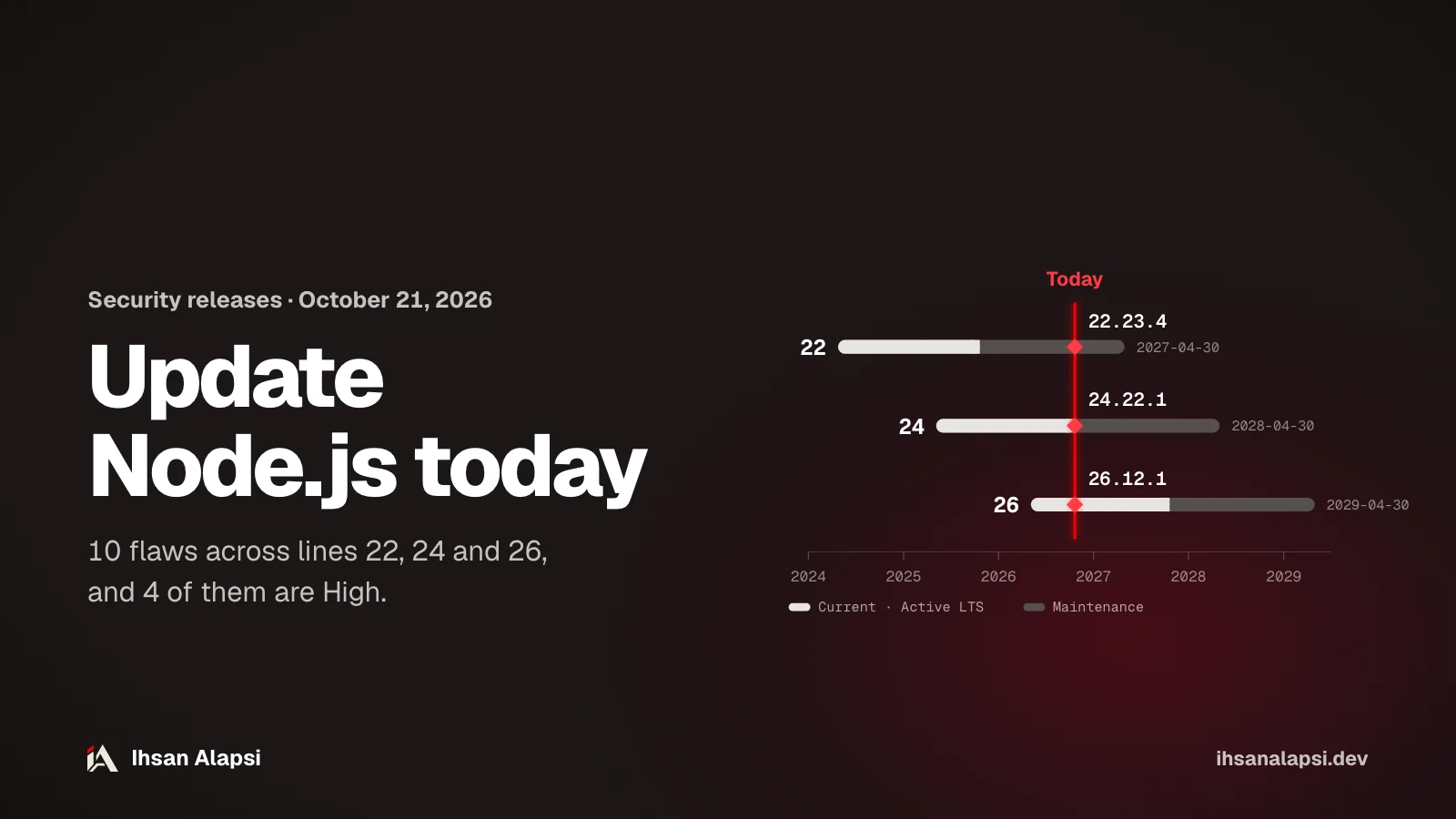
Update today to 22.23.4, 24.22.1 or 26.12.1: the update closes 10 flaws, 4 of them High, including a Brotli bug that allows remote code execution. Line 26 is planned to become LTS on October 28.
If you have a Node.js service running in production, you have two decisions today: update now or wait, and which line to pin your projects to for the next year. And after the update, you still need to confirm that production is running the new version, from your machine all the way to the Docker image.
Do you need to update Node.js today?
Yes. The Node.js updates released on October 21, 2026 close at least one High severity flaw on every supported line. The security page lists lines 22, 24 and 26 as affected, and the fix is in 22.23.4, 24.22.1 and 26.12.1, or newer on the same line.
The security page names the fixed version for each line, and the schedule.json file in the release team's repository gives each line's phase and end of support. The future dates in it are planned, and the repository itself writes under its table "Dates are subject to change":
Line | Version with the fix | Phase | End of support |
|---|---|---|---|
22 | 22.23.4 | Maintenance since 2025-10-21 | 2027-04-30 |
24 | 24.22.1 | Maintenance since 2026-10-20 | 2028-04-30 |
26 | 26.12.1 | Current, and becomes LTS on 2026-10-28 | 2029-04-30 |
If you're still on 20 or 25, there's no version for you in this update. Line 20 reached end of support on April 30, 2026 and line 25 on June 1, 2026, and the page says it plainly: "End-of-Life versions are always affected when a security release occurs". So you need to move to a supported line.
To see where you stand, run this command on your machine, on every server and inside every container, and compare the number with the table:
node -vWhat are the ten flaws these updates close?
The security page lists 10 flaws: 4 rated High, 3 Medium and 3 Low. Line 26 is affected by all ten, line 24 by 8 of them, and line 22 by 7.
ID | What it is (its title on the page) | Severity | Lines |
|---|---|---|---|
CVE-2026-105482 |
| High | 26, 24, 22 |
CVE-2026-105483 | TLS certificate hostname check bypass when the IP is written in fullwidth digits | High | 26, 24 |
CVE-2026-106069 | Hostname check bypass when the host is loosely converted to an IP address | High | 26, 24, 22 |
CVE-2026-111497 | Out-of-bounds memory write in the Brotli decoder allows remote code execution | High | 26, 24, 22 |
CVE-2026-105481 | A keep-alive connection processes a response written before the request was sent | Medium | 26, 24, 22 |
CVE-2026-106072 | Wrong certificate check for IPv4 names written in a non-standard form, so a certificate for a domain name passes for an IP address | Medium | 26, 24, 22 |
CVE-2026-106074 | The random data cache of | Medium | 26, 24, 22 |
CVE-2026-106070 |
| Low | 26 |
CVE-2026-106071 | The Permission Model grants wider file permissions than requested with a wildcard | Low | 26 |
CVE-2026-106073 | Permission Model bypass with | Low | 26, 24, 22 |
The page and the release notes disagree on two points. First: the 26.12.1 notes, like the 24.22.1 and 22.23.4 notes, put CVE-2026-106072 on the same line as CVE-2026-106069 with High next to them, while the page gives 106072 a Medium severity. Take the severity from the page, because it's the security announcement itself. Second: the 26.12.1 notes don't mention CVE-2026-106071 by number. They have an unnumbered fix called "src: fix the fs permission tree node on wildcard nodes" by James M Snell, and the page thanks jasnell for fixing 106071, but no source links the two explicitly.
As of October 21 there is no published record for these IDs on cve.org, and the security page only gives each flaw's title, severity and affected lines: it has no CVSS score, and it doesn't say which version each flaw started in. So the reference you have is the fixed version for your line, and the clearest public explanation is the messages of the commits that carry the fixes in the nodejs/node repository on GitHub.
Along with the flaws, the update refreshes libraries inside Node: c-ares and undici on all three lines, OpenSSL on 24 and 22, and SQLite on 22. It also updates the bundled CA certificates, and the page links this to "eMudhra Intermediate CA Compromise".
What does the Brotli flaw mean, and how does it reach your service?
The Brotli flaw (CVE-2026-111497) is a decompression bug that writes outside memory bounds, and it's the only one on the list whose title says "remote code execution". It concerns you if your service decompresses Brotli data that comes from outside, and it's on all three lines.
Brotli is a lossless compression format described in RFC 7932, and it's what you see in HTTP as Content-Encoding: br. In Node, decompression runs when you call zlib.brotliDecompress() or zlib.createBrotliDecompress().
The built-in fetch also decompresses Brotli for you. In the undici code inside Node 24.22.1, any request to an https address gets the header accept-encoding: br, gzip, deflate if you didn't set one yourself. And if the server returns the response with Content-Encoding: br, fetch decompresses it with zlib.createBrotliDecompress. So a service that pulls data from an outside API with fetch may be decompressing Brotli even if you never wrote a single line of compression code: the server you're talking to is the one that chooses to return br.
The page didn't publish how the flaw is exploited, and didn't give a workaround. The fix itself comes from the Brotli library: Node brought over a commit from google/brotli titled "Detect and report invalid stream earlier", on the decompression file c/dec/decode.c. And there is no announced fix other than the update.
What does a TLS hostname check bypass mean?
The hostname check is the step where Node confirms that the server's certificate was issued for the name or IP you requested. Three flaws in this update let this check pass wrongly when the IP is written in an unusual form.
In the Node docs, the check is called tls.checkServerIdentity(), and it confirms that the certificate was issued for the hostname you're connecting to. The three flaws:
CVE-2026-105483 (High, on 26 and 24): the IP is written in fullwidth digits, meaning characters like "1" instead of "1".
CVE-2026-106069 (High, on all three lines): the host is loosely converted to an IP address.
CVE-2026-106072 (Medium according to the page, on all three lines): an IPv4 address written in a non-standard form lets a certificate issued for a domain name pass for an IP address.
The same address can be written in more than one form, and some forms read as a different address. Try this code, and see what the URL parser returns for each form:
for (const host of ['127.1', '0x7f.0.0.1', '127.0.0.1', '0127.0.0.1']) {
  console.log(host, '->', new URL('https://' + host + '/').hostname);
}
// 127.1 -> 127.0.0.1
// 0x7f.0.0.1 -> 127.0.0.1
// 127.0.0.1 -> 127.0.0.1
// 0127.0.0.1 -> 87.0.0.1
The last line came out as 87.0.0.1, because the URL parser reads a number that starts with zero in base eight (octal), according to the URL standard.
The message of the fix commit explains the problem: the TLS identity check normalized the numeric address before comparing it with the certificate, while the operating system's resolver can read the original text as a different address. So the certificate gets checked against one address, and the connection can go to another.
The fix for 106069 and 106072 is called "tls: reject non-canonical IP addresses", and the fix for 105483 on its own is called "tls: fix ip normalization regression". After the update, tls.checkServerIdentity() rejects any host that only becomes an IP address after it's normalized, and returns the error ERR_TLS_CERT_ALTNAME_INVALID with the reason "Host is a non-canonical IP address". The commit's own test connects to 0127.0.0.1 and expects this error.
So if you have a service that takes the hostname as text, from settings or from the user, and connects to it over TLS, look for numeric addresses written in short form or with a leading zero. On the new versions this connection fails with that error, so test them before production and write the address in its normal form, like 127.0.0.1.
Why does randomUUID repeat the same values in snapshots and SEA?
Node prepares a batch of random data in advance for randomUUID() and randomInt() to make them faster. The flaw CVE-2026-106074 is that this batch got saved inside the startup snapshot or the SEA, so every process that starts from them produces the same values.
The crypto.randomUUID() docs say that by default Node "generates and caches enough random data to generate up to 128 random UUIDs". A startup snapshot is a file that saves your app's state after initialization and loads it again when it starts, and you make one with --build-snapshot. And a SEA (Single Executable Application) is a copy of the node executable with your script injected into it, so you get one file to distribute.
If you use neither of them, this flaw doesn't concern you. And if you use them and generate with randomUUID() a value nobody should be able to guess, like a session token or a password reset link, this is the first thing to fix.
Here the update alone isn't enough. The fix commit empties this cache before the snapshot is saved and after it's loaded again, but a file you built before the update stays as it is. A SEA contains the node version you built it with, so you have to rebuild it with the new version (SEA docs). The snapshot has to be rebuilt too: according to the --snapshot-blob docs, Node refuses to load a snapshot built with another version and exits with exit code 1.
Which line should you pin your projects to next year?
Line 26. According to schedule.json, line 26 becomes LTS on October 28, 2026 and stays supported until April 30, 2029, the longest support among the lines available today. Line 24 keeps getting security updates until April 30, 2028, but in the Maintenance phase.
Line 24 entered Maintenance on October 20, 2026. According to the repository README, this phase is "Critical bug fixes and security updates", and a new feature in it is an exception the release team decides on, usually when it helps with moving to a newer line. As of October 21, the README table still lists it as Active LTS, but the date in the file is October 20.
Line 22 ends on April 30, 2027, and after that there are no security updates. If you have a project on it, put the move in your plan for the coming months.
Line 26's codename is still empty in the file, so write the number 26 in your files instead of any name.
The first releases of line 27 come out on October 28 in the Alpha phase, and according to the README they are "not for production use". It becomes Current on April 22, 2027 and LTS on October 20, 2027.
From 27 onward, the project releases one major version a year, and every line becomes LTS (announcement of the release schedule change, March 10, 2026). And according to the same README, these lines stay Active LTS for the full 30 months and never go through the Maintenance phase. If you're learning Node from scratch right now, start directly on 26, and plan the rest of your path with Developer Roadmap 2026.
Where do you start the update now?
Start with production: see what it's running, then pin the number in your project and CI, and finally rebuild your Docker images. An image built before the update stays on the old version until you rebuild it.
Run
node -von every server and inside every container. It should print 22.23.4, 24.22.1 or 26.12.1, or newer on the same line.Update the
.nvmrcfile with the new number. According to the nvm README,nvm installandnvm useread the version from this file if you don't give one:echo "24.22.1" > .nvmrc nvm install node -vWrite the minimum in the
enginesfield inpackage.json. Note that>=24.22.1on its own accepts 26.0.0, which is older than the fixed version on line 26, so write each line separately:{ "engines": { "node": "^22.23.4 || ^24.22.1 || >=26.12.1" } }According to the npm docs, without
engine-strictthis field is "advisory only", and it prints warnings when your package is installed as a dependency. So if you want npm to stop the install in your project on a version outside the range, add this line to.npmrcin the project. With it,npm installfails with anEBADENGINEerror instead of the warning (engine-strict docs):echo "engine-strict=true" >> .npmrcMake CI fetch the latest version.
actions/setup-nodeby default (check-latest: false) uses the version cached on the runner if it matches (the docs), so it can stay on a version older than the fix:strategy: matrix: node-version: [22.x, 24.x, 26.x] steps: - uses: actions/checkout@v7 - uses: actions/setup-node@v7 with: node-version: ${{ matrix.node-version }} check-latest: true - run: node -v - run: npm ci - run: npm testRebuild your Docker images with
--pulland deploy them. On amd64 and arm64, the 22, 24 and 26 tags on Docker Hub started pointing to the new versions on October 21, and the other architectures get added when their builds finish: according to the official images README, the build can take hours.--pull(Docker docs) makes the build pull the newest image instead of the copy cached on your machine, andnode -vinside the image confirms what you got:docker build --pull -t my-api . docker run --rm my-api node -vAnd watch out for
node:lts: according to the same README it's the Active LTS version. Right now it points to 24.22.1: line 24 moved to Maintenance, but line 26 isn't LTS yet. When 26 becomes LTS on October 28 per the schedule, the tag is expected to move with it, so if you don't want to switch a whole line without noticing, write the number inFROM, likenode:24.22.1-bookworm-slim.Run your tests before production, especially on 26: the 26.12.1 notes include a revert of a change to ES module loading ("Revert "module: synchronously load most ES modules"").
The update closes flaws in Node itself, and the permission flaws in your own code stay as they are. For that work I'm preparing the Security Skill Pack, which isn't out yet: skills that review your project's code and warn you about IDOR and permission flaws before you deploy. And if you want someone to test your platform the way an attacker would, Muhassan's penetration testing checks at the web and API layer whether sessions can be stolen or forged, and whether one user can reach another user's data.
What's the oldest Node version running in your production right now?
FAQ
If my project is still on Node 20, will I get a fix?
No. Line 20 reached end of support on April 30, 2026 according to the release schedule, and the security page says versions past end of support are always affected by any security release. The fix is to move to a supported line, 24 or 26, and if you can't move now, the Node.js site points to commercial support for these versions from partners in the OpenJS Ecosystem Sustainability Program.
Do I need to update if I don't use Brotli or SEA?
Yes. Five of the ten flaws concern networking (TLS, DNS and keep-alive), and the built-in fetch decompresses Brotli on its own if the server returns a response compressed with br, even if you never wrote compression code. SEA and snapshots concern only one flaw.
Do the official Docker images get the new versions on their own?
On amd64 and arm64, the 22, 24 and 26 tags on Docker Hub started pointing to the new versions on October 21, 2026, and the other architectures get added when their builds finish. An image you built before that stays on the old version until you rebuild it with --pull and deploy it, so confirm with node -v inside the container.
What's the difference between Active LTS and Maintenance?
Active LTS gets features and fixes after the release team reviews them, while Maintenance gets critical fixes and security updates, and rarely a feature that helps with moving to a newer line. Line 24 entered Maintenance on October 20, 2026. From line 27 on, every line stays Active LTS for the full 30 months and never goes through Maintenance.
When does Node 27 come out, and is it fit for production?
According to the planned schedule, the first release of line 27 comes out in the Alpha phase on October 28, 2026, and it's for libraries and CI, not production. After that it becomes Current on April 22, 2027 and LTS on October 20, 2027, and the dates may change.
Where do I hear about future Node.js security releases?
On the nodejs-sec list on Google Groups, which the security page itself recommends. It's an announcements-only list with few messages, covering flaws and security updates for Node.js and for the projects in the nodejs organization on GitHub.