PHP2Shell: two core PHP flaws a WordPress update alone won't fix
PHP2Shell is two flaws in PHP itself, not in WordPress. The fix is PHP 8.5.12, 8.4.27, 8.3.36, 8.2.35 or newer, or a distribution package with the fix. Update it or ask your host today.
On October 21, 2026, the PHP team released an emergency security update for two flaws that could let an attacker run code on the server without logging in. If your site runs on WordPress, Laravel or anything built with PHP, the first thing you need is your PHP version number, then what to send your host, and what to do if your version no longer gets updates.
What is the PHP2Shell flaw?
PHP2Shell is the name for two flaws in PHP itself, CVE-2026-109618 and CVE-2026-109619, that can let an attacker who hasn't logged in run code on the server. The PHP team rated both 9.2 out of 10 on the CVSS v4.0 scale.
This kind of flaw is called RCE, meaning remote code execution: the attacker sends a request to the site, and the server runs their commands with PHP's permissions. The problem in both, according to the security announcement on php.net, is in how PHP handles memory when a request fails halfway:
Flaw | What happens inside PHP | What the researchers showed |
|---|---|---|
CVE-2026-109618 | Memory runs out while the request is half prepared, and request cleanup treats the incomplete data as if it were valid | Code execution without login on WordPress, Drupal and Joomla |
CVE-2026-109619 | A request's data stays alive after its memory is freed, and a later request on the same worker can use it | Code execution without login on WordPress and Drupal |
The researchers published what they showed on the php2shell.com disclosure site, which belongs to Wiz. What they showed also includes leaking a worker's memory in any PHP application, without running code. And according to them, almost every PHP version back to PHP 5.4 has at least one of the two flaws, and the risk varies with the version and the settings.
According to the PHP Foundation, the first to report to the PHP team were Calif and OpenAI's Codex Security team, on the same day, August 11, 2026, followed by Wiz Research on August 24. The first signs of the memory problem were found by a PHP team developer in 2024, during the security audit Quarkslab did for PHP. And Wiz says it used AI models throughout the research, from finding the flaw to writing the exploit.
Why isn't updating WordPress and plugins enough?
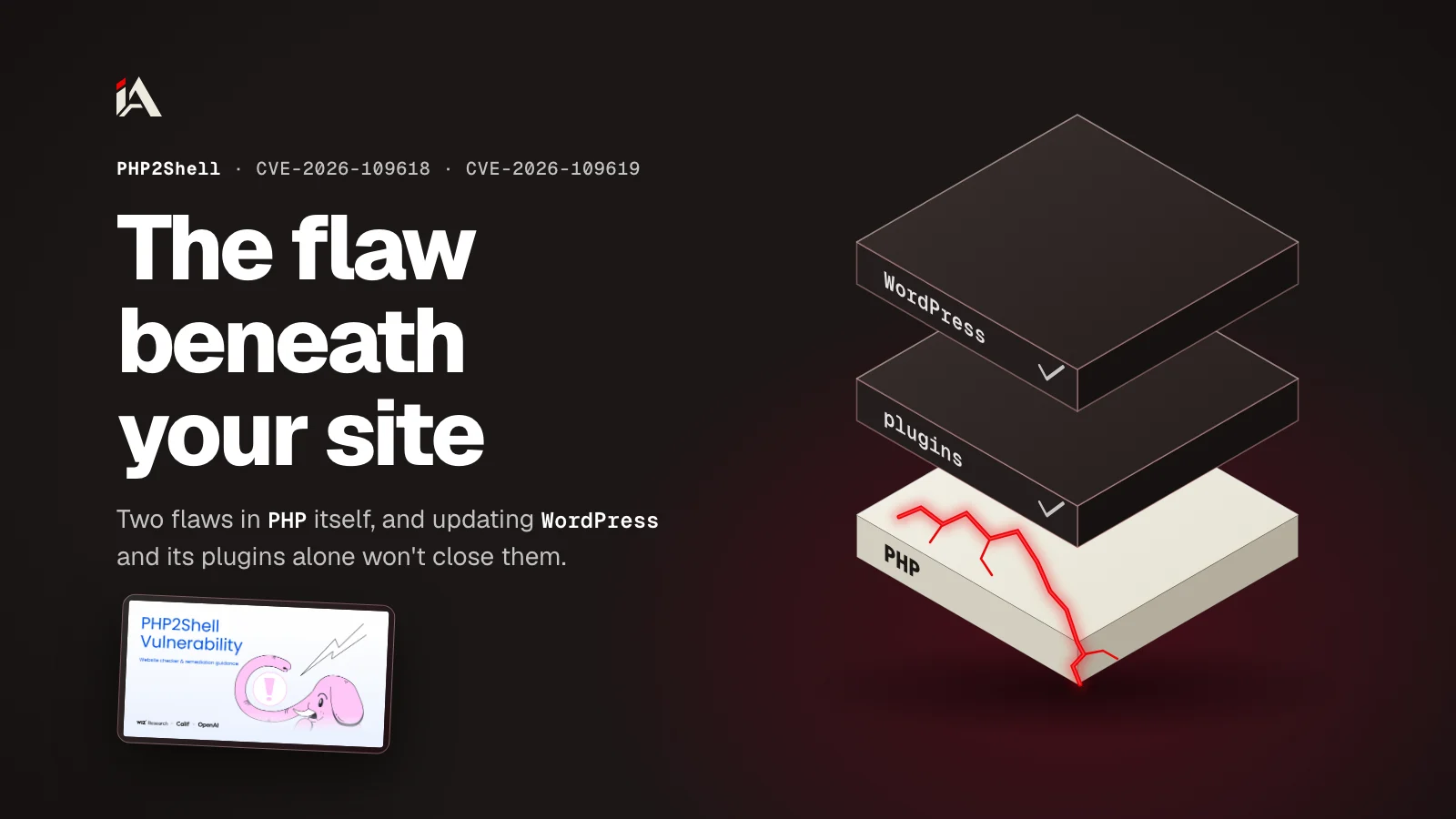
Updating WordPress and plugins isn't enough because the two flaws are in PHP, the program that runs WordPress, not in the site's code. So your code can be clean and up to date while the server is exposed.
According to Wiz, the exploit doesn't need a mistake in the application code, and even a "Hello World" page on an affected version can be hit. And according to the disclosure site, updating the application doesn't update the PHP underneath it. Updating plugins here is like changing the locks on the rooms while the building's main gate is broken.
Who is at risk, according to PHP:
Every PHP install that serves web requests: PHP-FPM, Apache with mod_php, php-cgi, FrankenPHP and LiteSpeed.
The risk is highest on mod_php, because an exploit was shown on it that works with a request from someone who hasn't logged in, before any line of the application code runs.
The researchers tested on WordPress, Drupal and Joomla as examples, and said the exploit doesn't need any of them. Laravel, Symfony, Moodle and Nextcloud also run on PHP.
As for a site built without PHP, like the Next.js projects you can find examples of on the projects page, the two flaws don't touch it, unless PHP is running next to it on the same server: phpMyAdmin, for example, or a WordPress blog on a subdomain.
How do I know if my site is affected?
Your site is affected if the PHP version serving it is older than the first fixed version on its branch (for example any 8.3 before 8.3.36), unless PHP comes from distribution packages that include the fix, which you check below. You need the full three-part number, because the fix is in the last part.
Branch | First fixed version | Security support until |
|---|---|---|
8.5 | 8.5.12 | December 31, 2029 |
8.4 | 8.4.27 | December 31, 2028 |
8.3 | 8.3.36 | December 31, 2027 |
8.2 | 8.2.35 | December 31, 2026 |
8.1 and older | No official release (source fixes for 7.4, 8.0 and 8.1 only) | Ended |
The support dates are from the supported versions table on php.net. To find your number, pick the method that suits you:
In WordPress, open Tools, then Site Health, then the Info tab, and expand the Server section. The PHP version line gives you the version running on your site.
In cPanel, the MultiPHP Manager tool shows the PHP version for each domain. If it only shows the branch (8.3, for example), go on to the next method to get the full number.
For the most exact number, create a file in the site's root folder with a name that's hard to guess, put the line below in it, and open it in the browser. It shows the version number on its own. Delete the file as soon as you see the number.
<?php echo phpversion();If you used
phpinfo()instead, delete that too: the page shows server settings, environment variables and headers, and that's information that helps an attacker.On your own server,
php -vgives you the command-line version, and it can differ from the version that runs the site through PHP-FPM. Sansec advises checking PHP-FPM settings with a request that goes through it, not from the command line. The same goes for the version number: the temporary file is more exact thanphp -v.
If the server gets PHP from the distribution's repository (Ubuntu or Debian, for example), the number may still look old while the fix is inside, according to The Hacker News. Search for the flaw IDs in the package changelog (the package name depends on your version):
apt changelog php8.3-fpm | grep -E 'CVE-2026-10961[89]'
rpm -q --changelog php-fpm | grep -E 'CVE-2026-10961[89]'
What do I need to do now?
Update PHP to the first fixed version on your branch, and restart everything that runs PHP. On shared hosting, the host does the update and your part is to ask for it; on your own server, you do the update.
On shared hosting
Here you can't install the update yourself; that's the host's job. But if your panel is cPanel and your version is 8.1 or older, the MultiPHP Manager tool lets you move the domain to a newer branch from the versions your host has installed.
And if the host manages PHP, Cloudflare advises asking them to apply the update. Send this message to their support team today, and if their support works in another language, translate it and keep the same points:
Subject: PHP2Shell (CVE-2026-109618, CVE-2026-109619): please confirm the PHP patch

Hello,

PHP released security fixes on 21 October 2026 for CVE-2026-109618 and
CVE-2026-109619 (PHP2Shell, unauthenticated remote code execution).

For my account and the domain [your domain], please confirm:
1. Which PHP version serves my site, with the full number (for example 8.3.36).
2. When you will update to 8.5.12, 8.4.27, 8.3.36 or 8.2.35 (or confirm
   that your PHP package includes the fixes for both CVEs), and restart
   PHP-FPM / Apache after the update.
3. If my site runs PHP 8.1 or older: whether you apply a backported fix,
   or which supported version I can move to.

Thank you.
When they reply, check the number yourself with one of the methods above.
On your own server
Make a list of every place you have PHP, not only the site. Huntress warns that PHP can be hidden inside packaged software: panels like cPanel and Plesk, and Windows programs that include
php.exeorphp-cgi.exe. By the end of this step you know what needs updating.Update from the distribution's repository or build from source. PHP says distributions and LTS vendors got the fix before the announcement, so run your usual update command, and if no new packages arrive, follow your distribution's security page.
If you get PHP from the Remi repository (rpms.remirepo.net), switch to the distribution's packages or build from source: PHP advised this because the repository had no update on October 21.
Restart PHP-FPM, Apache and any long-running worker, as the disclosure site asks.
If you have PHP inside Docker images, rebuild the images on a base image with the fixed version, and deploy them.
Confirm the number with a web request (the temporary file above), not with
php -valone.Review
memory_limitafter the update: the fix adds a strict memory limit, and when a process reaches it, it's killed and its shutdown handlers don't run. If you have scripts that use a lot of memory, test them. And if you setmemory_limit=-1as a temporary measure (below), set it back to a fixed value after the update: with-1one request can use up all the server's memory, according to Sansec.
If your version is 8.1 or older
8.1 and older versions no longer get updates from the PHP project. The PHP team published small source fixes (backports) for 7.4, 8.0 and 8.1, but they're for people who build PHP from source or don't have an LTS vendor. Some distributions and LTS vendors have backported fixes, so ask your provider.
The lasting fix is moving to a supported branch. And 8.2 also reaches end of support on December 31, 2026, so if you're moving now, go to 8.3 or newer so you don't have to move again in two months. Test the site on a staging copy before you switch, because an old plugin may not work on a newer branch. And until you move, Huntress advises isolating any end-of-life PHP from the internet.
Do temporary settings and Cloudflare protect me until I update?
Temporary settings and Cloudflare rules reduce the risk, but they don't close the flaw. The update is the only complete fix, according to PHP's security announcement:
"While only an update is a complete solution, the following measures reduce exposure to specific attack paths but do not make an installation safe."
In plain words: these measures only close specific attack paths, and the installation stays unsafe. If you can't update today and you have access to the server settings, these are the settings PHP published:
memory_limit=-1set in a way the application can't change, likephp_admin_valuein the pool or Apache settings, and set it back to a fixed value after you update.A low
post_max_size:8Mif your site has no file uploads, and32Mif it does.session.upload_progress.enabled=0inphp.inior the pool settings, then restart all workers.ini_set()and.user.inidon't work here.On 8.5 only:
fatal_error_backtraces=0, then restart.
The disclosure site warns that some of these settings can affect how the application works or how stable it is, so test them before you rely on them.
As for Cloudflare, it released WAF rules for the two flaws, and the free plan gets them automatically without you doing anything. On paid plans (Pro, Business and Enterprise), make sure the Managed Ruleset is on in block mode. But Cloudflare itself says you have to update PHP even with these rules, because they're an extra layer of protection, not a fix. And it has seen attackers changing the shape of attack requests to get past its rules. The rules also only apply to requests that pass through Cloudflare: if your site's DNS record is set to DNS only, requests go straight to the server and Cloudflare doesn't protect them.
Is anyone exploiting the flaw right now?
Yes, there are exploitation attempts, but as of 17:27 UTC on October 21, 2026 no source had confirmed a specific server being hacked, according to The Hacker News. Cloudflare and watchTowr have seen attacks, and the two flaws are not yet on the CISA list of exploited vulnerabilities.
Time (UTC, October 21) | Source | What it said |
|---|---|---|
07:43 | Cloudflare (according to Sansec) | Reported early attacks on PHP sites before the update was released |
11:26 | watchTowr (according to The Hacker News) | Saw no exploitation in the wild |
At the announcement | The PHP security team (according to the PHP Foundation) | Checked the proof-of-concept (PoC) code that spread after the leak, and found none that worked |
Around 14:00 | Huntress | Saw no exploitation among its customers |
14:19 | watchTowr (according to The Hacker News and its FAQ page) | Started seeing exploitation attempts for the two flaws on its honeypot servers |
17:27 | The two flaws are not on it (list version 2026.10.21) |
Don't wait for confirmed exploitation before you update. According to the PHP Foundation, a video showing a working exploit leaked by mistake on the evening of October 20 and sped up people's work on exploits, and Sansec says technical write-ups and an exploit tool are now public.
What do I do if I'm worried someone got in before the update?
Update first, then search the server logs for the signs Wiz published. These signs alone don't prove a breach, but they tell you where to look:
Odd multipart requests, followed by memory limit errors.
Repeated HTTP 500 errors.
A large or malformed PHPSESSID cookie in responses.
PHP workers stopping and restarting for no clear reason.
Huntress adds one more sign: PHP processes running a shell or download tools, which a normal site doesn't do.
Search the web server and PHP-FPM logs, because the attack happens below the application, and WordPress or Laravel logs may show nothing. And if you find nothing, that doesn't mean you're safe: according to the disclosure site, memory can leak without code execution, and the absence of signs doesn't prove the server is unaffected. The leaked memory can contain passwords, tokens and API keys from other requests.
If you find a sign, Huntress advises these steps:
Isolate the server from the internet, and save a copy of the web server and PHP logs before you delete or reinstall anything. That way you keep the trace of the attack so you can understand what happened.
Search the site's root folder for new files you don't recognize, especially webshells: files an attacker plants so they can come back and run commands from them, and that stay in place after the PHP update.
Check whether new scheduled tasks (cron jobs) or new accounts were added on the server.
After that, rotate the API keys and passwords on the server. This step is needed even if you found no sign, if the server stayed on an affected version after news of the two flaws spread on October 20, because the leak may leave no trace. And if your site is on shared hosting, send the host the sign you found: they're the ones who can isolate and inspect the server.
Updating PHP only closes these two flaws. Flaws in your own code, like permissions and IDOR, need a separate review: the AI skills section has the Security Skill Pack (coming soon) for reviewing code before you deploy. And if your platform holds customer data or payments and you want someone to test it the way an attacker would, that's the job of Muhassan: penetration testing and security hardening.
Open your hosting panel now: what PHP number does it show?
FAQ
Is PHP2Shell the same as WordPress's wp2shell flaw?
No. wp2shell is the name for two flaws in WordPress's own code, fixed in WordPress 7.0.2, 6.9.5 and 6.8.6 in July 2026. PHP2Shell is in PHP, and updating WordPress doesn't fix it.
If my site is built with Next.js or Node.js, is it affected?
No, the two flaws are in PHP only. Unless PHP is running on the same server, like phpMyAdmin or a WordPress blog on a subdomain, in which case that needs updating.
My PHP version number on Ubuntu or Debian looks old. Does that mean my site is affected?
Not necessarily. Distribution packages can carry the fix under a version number that looks old. Search for CVE-2026-109618 and CVE-2026-109619 in the PHP package changelog: if both IDs are there, you have the fix.
What does CVSS 9.2 mean, and why did I see 10.0 on social media?
CVSS is a scale for a flaw's severity from 0 to 10. The PHP team rated both flaws 9.2 on CVSS v4.0, and the 10.0 figure spread with the leak on October 20, 2026 and didn't come from PHP.
Do I need to restart PHP after the update?
Yes: Apache, PHP-FPM and any long-running worker, according to the php2shell.com disclosure site. You don't need to restart the whole machine.
Can the flaw leak data even if the attacker doesn't run code?
Yes. The researchers showed a leak of a worker's memory in any PHP application without code execution, and that memory can contain passwords, tokens and API keys from other requests.