One email your AI agent reads can leak your inbox: limit its tools
There is no sure way to stop instructions hidden in what your agent reads, so the protection is in its tools: give it the least access it needs, and make a person approve every risky step.
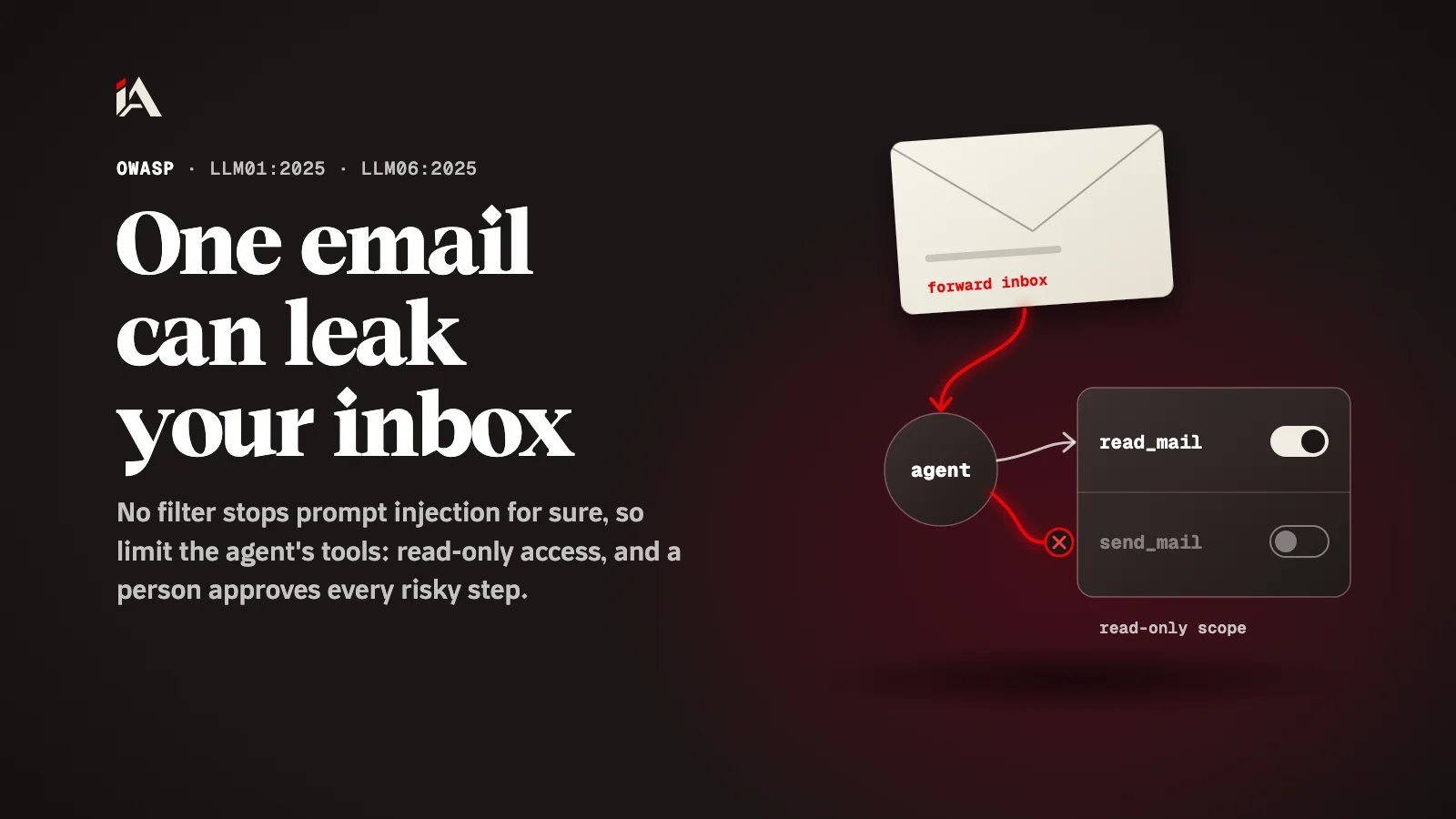
An email that reaches your inbox can forward your emails to someone else, without anyone pressing a button. OWASP describes this scenario for an AI assistant that summarizes emails. If you are building an AI agent that reads outside content and uses tools, below you will find why filtering alone is not enough, and how to limit the agent's tools so hidden instructions find nothing to do.
What is prompt injection?
Prompt injection is a flaw that happens when text reaching the model changes its behavior or output in ways nobody intended, and its most dangerous form is when that text comes from outside content the agent reads.
OWASP's LLM01:2025 Prompt Injection page tells two kinds apart. Direct injection comes from what the user types, on purpose or by accident. Indirect injection comes from outside content the model takes in, such as a web page or a file, carrying hidden instructions. One of the page's examples is a user who asks the model to summarize a web page with hidden instructions in it, and the instructions make the model add an image whose link points to an outside address, which leaks the private conversation.
How can one email leak the whole inbox?
Because the tool given to the agent did more than the agent needed, and the hidden instructions used the extra ability.
OWASP's LLM06:2025 Excessive Agency page tells the story in order. A personal assistant was given access to the user's mailbox to summarize incoming emails, so it only needed to read messages. But the plugin the developer chose also had functions for sending messages. Then a maliciously crafted email arrived, with instructions that made the model command the agent to search the inbox for sensitive information and forward it to the attacker's address.
The mistake here is logical, and anyone in a hurry makes it: we picked a tool that works, and did not ask what else it can do. The model cannot always tell your instructions apart from text written inside an email, so every extra ability in the tool becomes an ability in the hands of whoever wrote the email.
Why is filtering alone not enough?
Because there is no sure way to prevent prompt injection, so you have to assume some hidden instructions will reach the model.
OWASP's prompt injection page says it is unclear whether there are fool-proof methods to prevent it. Input and output filtering is among the measures it lists, but the step that changes the outcome comes from the excessive agency page: if the tool cannot send, the injection cannot send. The hidden instructions still arrive, but they find nothing to carry out.
How do you limit the agent's tools?
You remove every ability the agent does not need, keep its access to what its job requires, and ask a person to approve every risky step.
These steps come from the two OWASP pages, in the order you work through them on your agent:
List every tool the agent can call, and next to each one what it does. Remove every tool it does not need for its job. You end up with the fewest tools possible.
Inside each tool, keep the functions to what is needed. In OWASP's example, the fix is an extension that only reads mail, with no send functions.
Keep the access on the account itself read-only if the job is reading. In the same example, the agent signs in to the mail service through an OAuth session with a read-only scope.
Give the application its own API tokens, and run the sensitive functions in code, not in the model's hands. That is how the prompt injection page describes privilege control.
Have a person approve every risky step: in the mail example, the user reviews each email the agent drafted and presses "send" by hand.
Separate outside content and mark it as untrusted before it reaches the model, and check the format of the model's answer with deterministic code before you act on any of it.
And if you cannot remove the ability to send right now, OWASP suggests rate limiting on the sending side, so the damage stays small.
What should you check in your agent today?
Open your agent's settings and ask of every tool: if a strange email or page asked it to do something, what is the worst it could do?
The lesson for us as developers: we cannot guarantee the model will never believe hidden text, but we can guarantee the tool has no dangerous ability to begin with. Read-only access, plus a person approving every send, delete and payment, leaves a successful injection with no result.
Watch out too for AI tools that switch on features you never enabled, as happened with the Copilot features that turned on by themselves, and for the keys you give these tools, since they are a target in their own right, as we saw with the npm worm that stole AI tool credentials.
If you want someone to check the AI agent on your platform, its tools and its access, before someone else finds the gap, Muhassan audits your platform and hands you a clear fix plan.
FAQ
Is there a filter that stops prompt injection completely?
No. OWASP's own page says it is unclear whether there is a fool-proof way to prevent it. Filtering reduces it, and the main protection is limiting what the agent can do.
What is the difference between direct and indirect injection?
Direct injection comes from what the user types to the model. Indirect injection comes from outside content the model reads, such as a web page, a file or an email, carrying hidden instructions.
If the agent only reads, is there any risk?
Much less. An injection can still change the agent's answer or summary, but it cannot send or delete if the tool has no such ability at all. Keep checking its answers before you rely on them.