Railway breach: what env vars leaked? Which secrets to rotate first?
An attacker decrypted part of the environment variables stored on Railway, and Railway revoked all its access tokens. If your account predates October 21, 2026, rotate every secret stored there, starting with your databases.
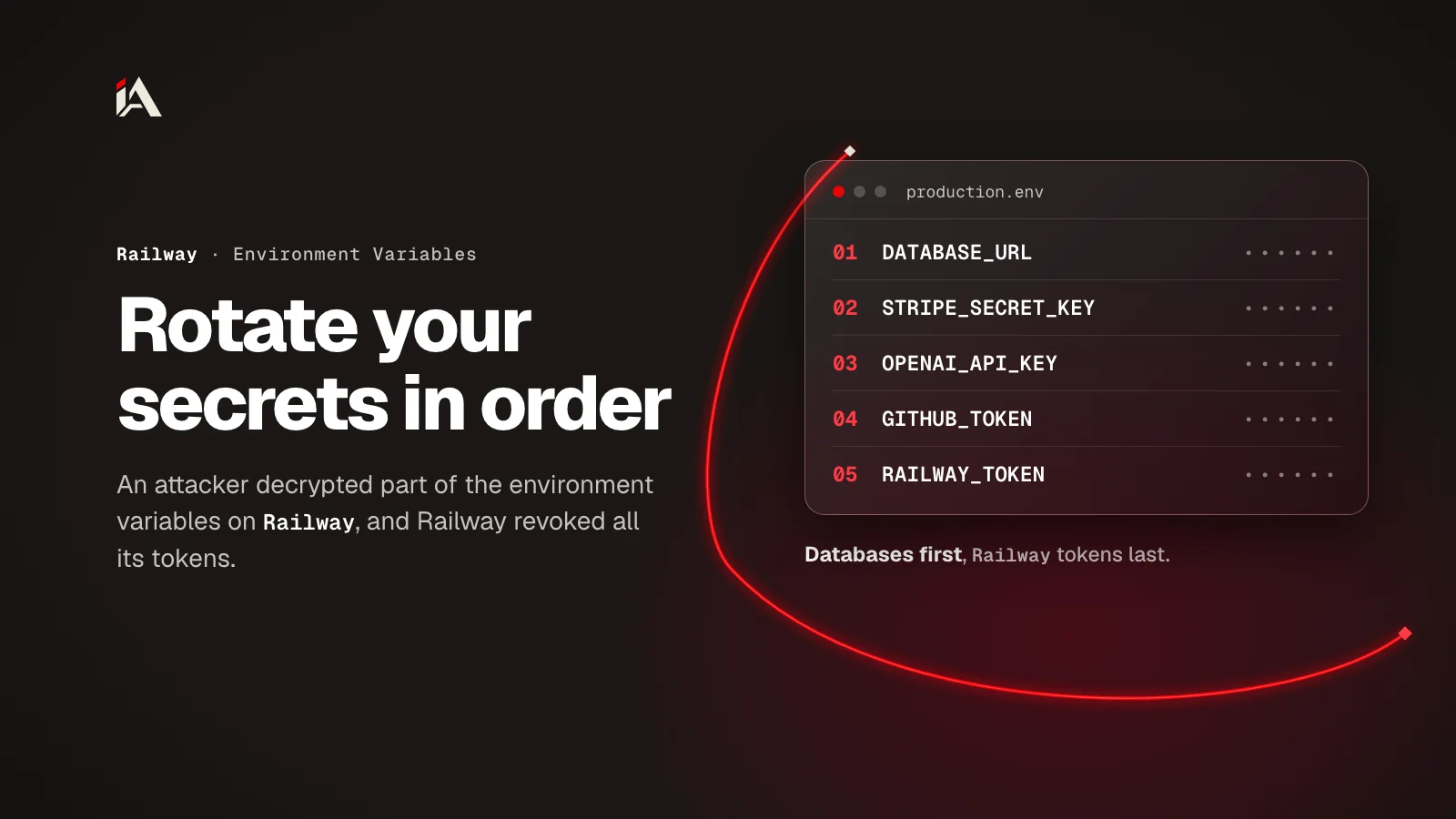
If you have a project on Railway, treat every secret you put in its environment variables as exposed until you change it. Environment variables are the values your app reads at runtime, like the database password and API keys, and Railway confirmed that an attacker pulled them in encrypted form and decrypted part of them. By the end of this article you'll know what happened, why your deploys stopped, in what order to rotate your secrets, and how to check that nobody used them.
What exactly happened at Railway?
An outside attacker got into part of Railway's internal systems between October 20 and 22, 2026, pulled the encrypted environment variables from its database, and decrypted part of them with keys they stole. Railway says the target was API keys for AI providers.
This is how the incident went according to the preliminary report Railway published on October 22. Times are in UTC:
Time | What happened |
|---|---|
October 20, 13:58 | Monitoring paged the team about abnormal latency. Railway counts this as the start of the attack |
October 20, 14:03 to 16:51 | They found a suspected privilege escalation attempt in the build systems and halted builds |
October 21, 04:24 to 05:23 | The investigation showed the attacker had pulled encrypted secrets but could not decrypt them yet |
October 21, 05:27 to 07:25 | The attacker got Railway's CI environment credentials and decrypted files holding more API access |
October 21, 07:25 to 09:18 | Database records showed queries against the encrypted environment variables, and part of them was decrypted with the stolen keys |
October 21, 09:25 | Railway notified providers and asked them to revoke keys |
October 21, 20:19 to 22:10 | It invalidated user sessions and published its security disclosure and key rotation guidance |
October 22, 03:32 | It confirmed the attacker no longer had access |
October 22, 17:00 to 22:49 | The API was fully back, and deploys returned on every plan |
The report doesn't say how the attacker first got in. Railway hasn't published exploit details yet, to protect customers, and has promised a final report. According to the report, the attack was after AI provider keys for distillation attacks. Distillation is training a less capable model on the outputs of a stronger one (as Anthropic defines it), and a stolen key puts those outputs on its owner's bill.
AI keys have been a repeated target this month. We saw the same thing in the credential stealer in LiteLLM 1.107.0, which pulled every provider key from the gateway's database in one go.
Who is affected, and what was exposed?
According to Railway, at most 1.85% of workspaces had environment variables that may have been exposed, which is about 100,000 workspaces. Still, Railway advises everyone who signed up before October 21 to rotate the keys stored with it.
That number is a ceiling, not a confirmed count. Railway wrote that the query alone can't show which keys exactly were affected, because the keys use envelope encryption: data is encrypted with one key, and that key is encrypted with another key (according to AWS documentation). It also says the attacker went after high-value targets: workspaces with a large number of environment variables, and environments with many AI provider keys.
What else the report says:
The attacker did not access Railway user accounts. Railway hasn't ruled out access to user source code yet and will settle that in the final report.
Railway sent providers the keys that may have been decrypted, sent providers such as GitHub every key on the platform, and some providers asked to revoke all keys. So your OpenAI key or another provider's key may already be revoked even if your workspace isn't in the 1.85%, and a revocation email doesn't mean your key was exposed.
It revoked all Railway access tokens, reset its GitHub App installations, and rotated the credentials for every storage bucket on the platform.
Why did your deploys stop after the incident?
Deploys stopped because Railway stopped accepting new deploys during the incident, and commits you pushed then were not queued, so your service still runs its last successful deploy from before. Now that deploys are back, two things can make them fail: Railway cut the GitHub connections, and it revoked API tokens and CLI sessions.
According to Railway's guide to recovering failing deploys, most services only need GitHub reconnected:
Open your account settings and check that your GitHub account is connected and that the Railway GitHub App still has access to the repository.
Disconnect the repository and connect it again from the service settings. In a team project, the person who first connected the repository has to do this.
Press CMD or CTRL with K and choose Deploy Latest Commit. You get a new deploy from the latest commit.
If you deploy from the command line, your old session was revoked, so log out and log in again:
railway logout
railway login
railway link
railway up
If you deploy from CI, create a new project token in Settings, then Tokens (or an account token in your account settings), with the same scope, and replace the old one in your CI secrets. If your CI runs on GitHub Actions, GitHub's documentation says a compromised action in a workflow can reach every secret configured on the repository, so pin each action to a specific commit (how to protect GitHub Actions if someone changes a tag).
In what order should you rotate your secrets?
Rotating a secret means creating a new value with the provider and revoking the old one, not just changing the value in Railway. Order the work by damage: databases first because they open your customers' data, then payments, then AI and cloud keys, and Railway tokens last.
Change the password of every database from Railway itself. For PostgreSQL, open the database service, then Database and Config, and click Regenerate next to the password. This changes
POSTGRES_PASSWORD, and with itDATABASE_URLandDATABASE_PUBLIC_URL. MySQL, MongoDB and Redis each have their own guide.Redeploy every service that uses the database. Services read variables only at startup, and Regenerate only redeploys the database itself. Any tool outside the project (your laptop, CI, reporting tools) needs the new value by hand.
Turn off public access to the database if nothing outside the project needs it: Settings, then Networking, then Public Access. This step comes from the report's own recommendations.
Rotate payment keys such as Stripe with the provider, and look for usage you don't recognize.
Delete your OpenAI, Anthropic, OpenRouter and Grok keys and create new ones. Don't wait for a revocation email from the provider: no email doesn't prove the key wasn't exposed.
Check your AWS or GCP account for unusual access, and rotate the keys that were in your environment variables.
Rotate GitHub tokens and registry credentials (such as Docker Hub), check the audit log in both, and review which installed GitHub Apps have access.
Last, create a new Railway token for CI and check that automatic deploys work again.
Railway warns in its PostgreSQL rotation guide: don't edit POSTGRES_PASSWORD or PGPASSWORD by hand, and don't run ALTER USER yourself. Each of these changes only one side, so the variable ends up with one value and the database with another. The same guide suggests a reference variable like ${{ Postgres.DATABASE_URL }} instead of a pasted connection string, so the service picks up the new password on its next deploy.
How do you see who is connected to your PostgreSQL database right now?
Connect to the database with railway connect Postgres and run the query from Railway's guide:
SELECT pid, usename, client_addr, application_name, backend_start, state
FROM pg_stat_activity
WHERE datname = current_database();
End any session you don't recognize by its pid, then check for new roles you didn't create:
SELECT pg_terminate_backend(12345);
SELECT rolname FROM pg_roles;
Replace 12345 with the pid from the first query.
How do you know if someone used your secrets?
Check usage and logs with each provider from October 20 until today: any request, payment, session or member you don't recognize is a sign the secret was used. Railway published guides for the main providers, and they all follow the same idea.
For AI keys, the Anthropic guide tells you to open the Usage page and group by key, the Cost page for the exposure window, Logs filtered to the key, and Members to see if anyone you didn't invite is there. The npm worm that steals AI tool keys went after the same kind of keys, so if you use a key in more than one place, change it everywhere.
For PostgreSQL, search the database service's deploy logs for
authentication failed. The database doesn't log successful connections by default, so a missing line doesn't mean nobody got in.For GitHub and your registry, the audit log shows who did what and when.
If you find changed data, save the evidence first, then restore from a backup or with point-in-time recovery.
Where do you start now?
Start with a list: every environment variable in every service on Railway, what it is, and which provider you rotate it with. The list walks you through the order above, and it shows you dead services that still hold live secrets, so delete them and their secrets.
If you want someone to test your platform and find where its secrets are exposed before the next incident, that's what Muhassan does. For now: open your first database on Railway and click Regenerate.
FAQ
I didn't get an email from Railway. Does that mean I'm not affected?
Not necessarily. Railway said it will email affected customers once it confirms their accounts, and it also advises everyone who signed up before October 21, 2026 to rotate the keys stored with it.
OpenAI or Google emailed me that my key was revoked. Why?
Because Railway sent providers the keys that may have been decrypted, sent some of them every key on the platform, and some providers asked to revoke all keys. So a revocation email doesn't mean your key was exposed, but you still need to put a new key in your environment variables and deploy again.
I got no revocation email from my provider. Is my key safe?
Not necessarily. No email doesn't prove your key wasn't exposed, and Railway advises everyone who signed up before October 21, 2026 to rotate their keys. Delete the key with the provider yourself and create a new one.
Is a new Railway token enough?
No. A new token only brings back deploys from CI and the command line. The database passwords and payment and AI keys that were in your environment variables keep working until you change them with each provider.
Did the attacker reach my project's code?
There's no final answer yet. Railway wrote that the attacker did not access user accounts, but it hasn't ruled out access to user source code, and it promised to settle that in its final report.